Your IDX, inside WordPress
Bring live MLS listings, SEO-ready property pages, and embeddable IDX widgets to any WordPress site with one plugin and one shortcode. No code required, and the site you already have stays exactly as it is.
Built for WordPress
Everything your WordPress site needs to do real estate
Install it once. Your listings go live, your theme stays exactly as it is.
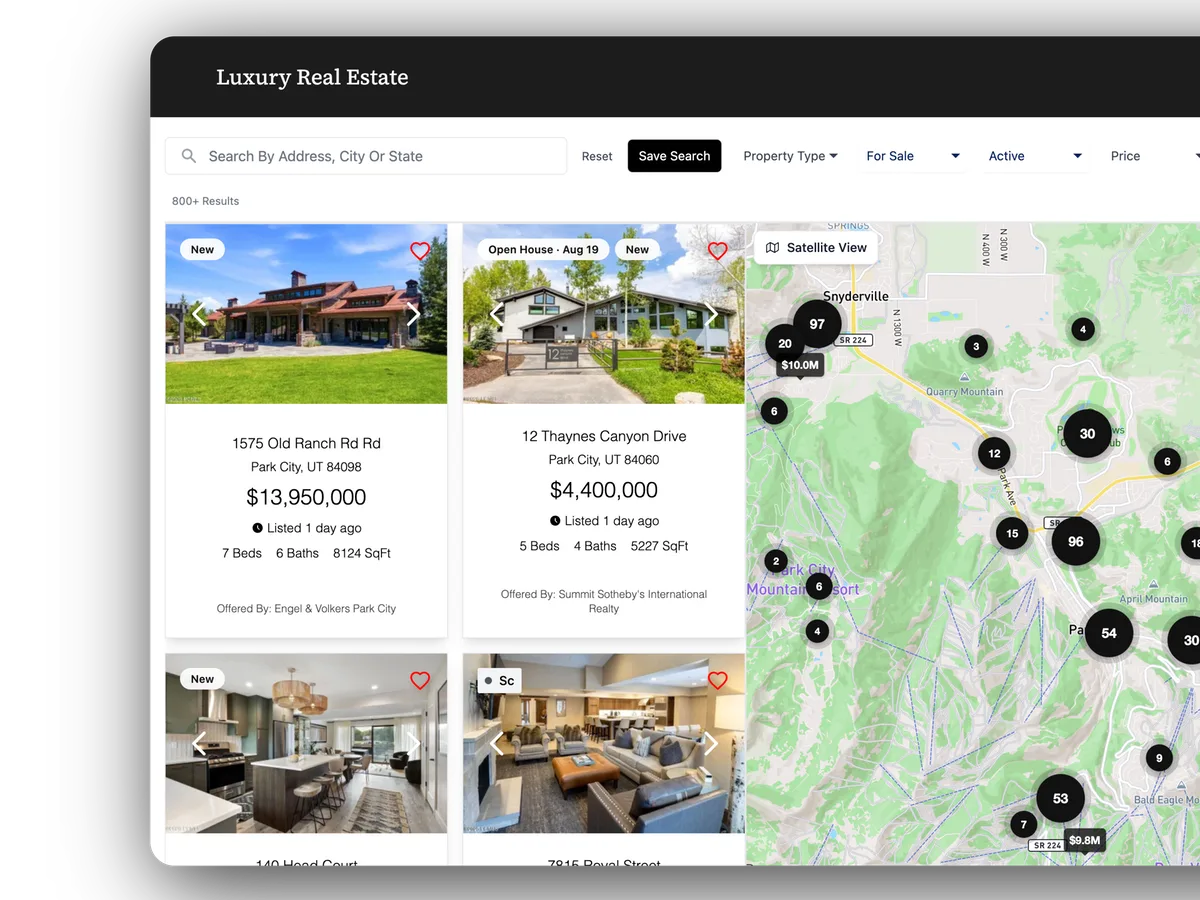
SEO Listing Pages
Every listing gets its own clean URL and shows up in Google with a real title, description, and preview image. It is built into your site, so search engines actually find it.
SEO Agent Pages
Every agent on your team gets their own SEO-ready profile page at a clean URL Google can index, with their photo, bio, contact, and active listings. It is generated automatically from your feed, so you never build a page.
Embeddable Widgets
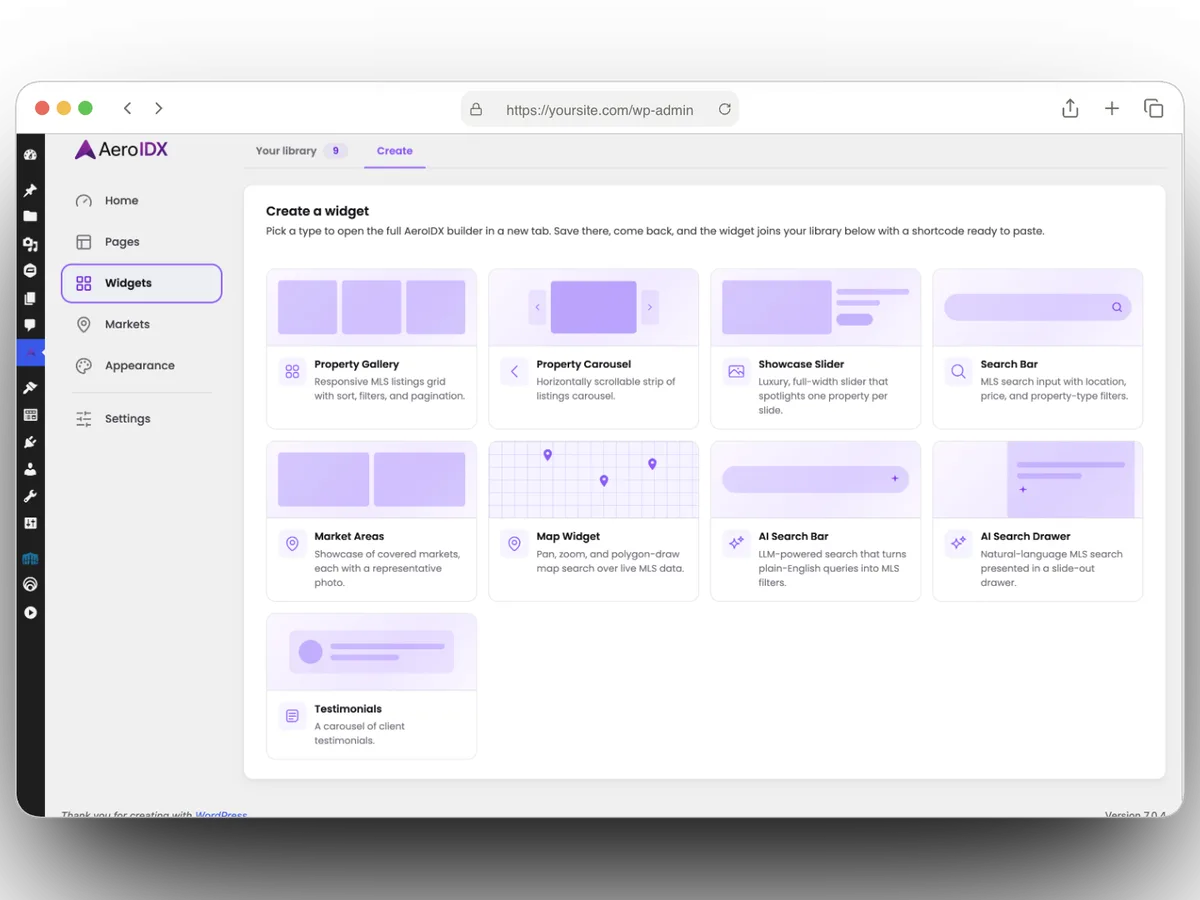
Drop property galleries, carousels, search bars, market areas, maps, and AI Search anywhere on your site. Each one is fetched live from the widgets you build in AeroIDX.
One Shortcode
Copy [aeroidx_widget id="…" type="…"] from your widget library and paste it into any page, post, or block. No JavaScript snippets, no embed mess.
One-Click IDX Pages
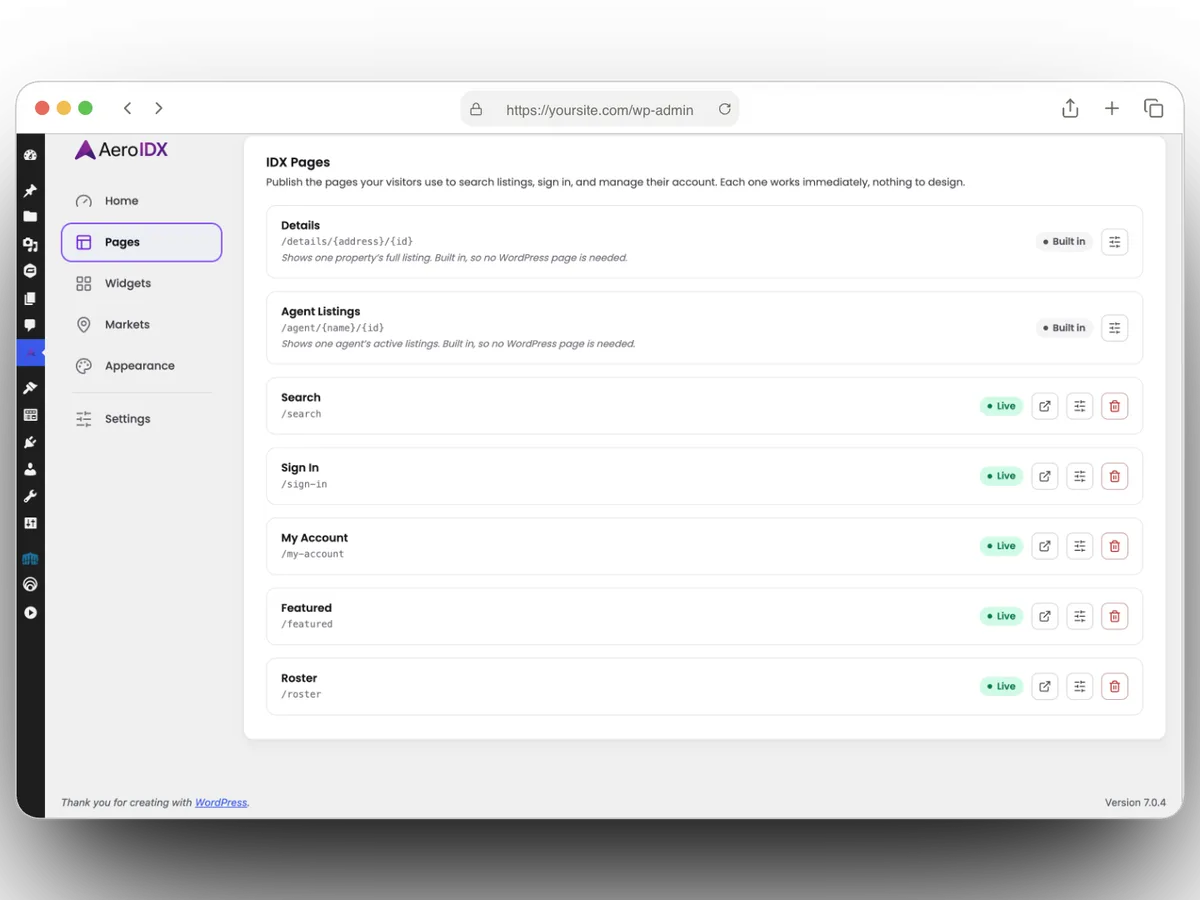
Spin up every AeroIDX screen (Search, Sign In, My Account, Featured, and more) as a real WordPress page with a single click. Each one stays synced with AeroIDX automatically.
Market Area Pages
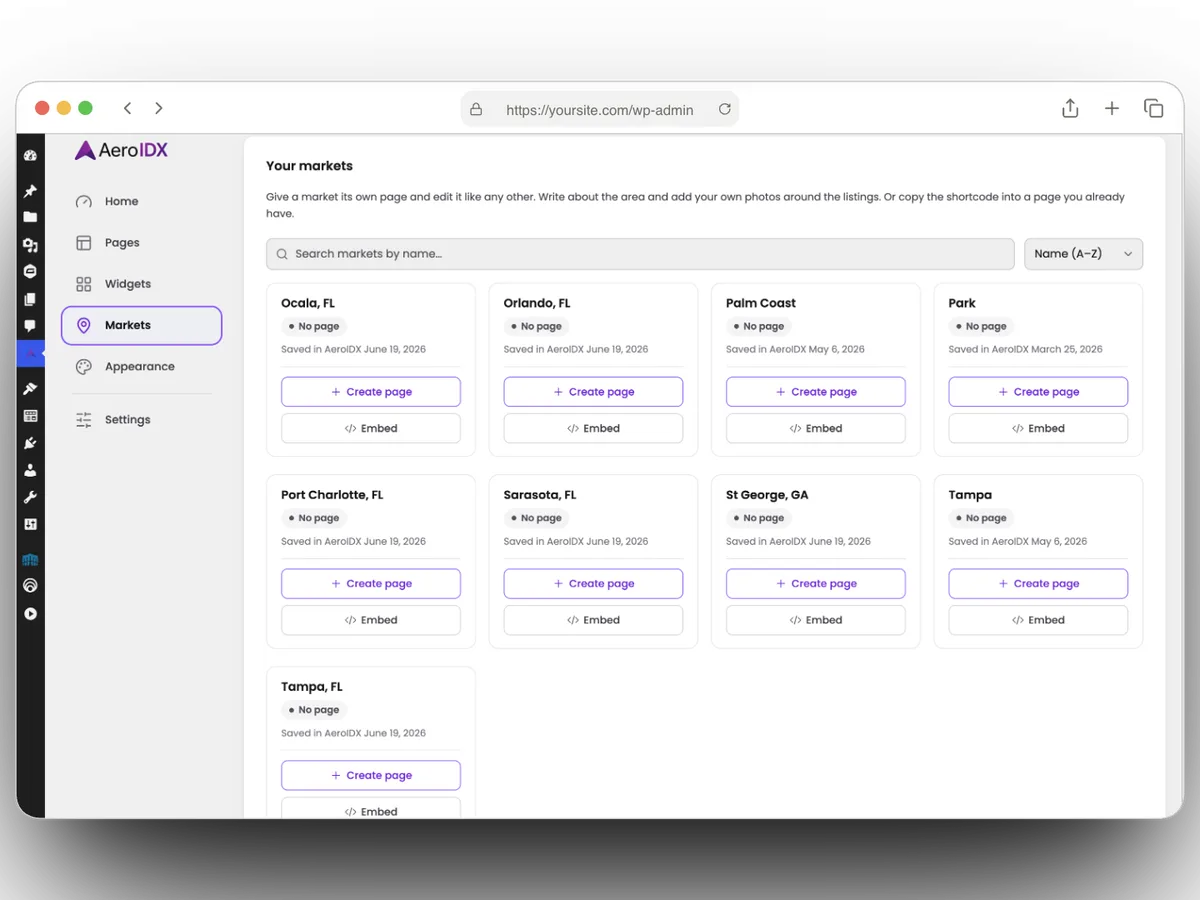
Turn any market on your account into a real WordPress page you can edit like any other. Add your own neighborhood copy and photos around the live listings, or paste the shortcode into a page you already have.
Works With Any Theme
Drop it into the site you already have. Your listings inherit your theme’s look automatically, so there is nothing to rebuild and nothing locking you in. Gutenberg, Elementor, Bricks, Divi, all of it.
WordPress-Native Admin
Configure everything from a settings panel inside WordPress Manager. Connect your API key once, build your pages, and embed your widgets. No code required.
Everything you Need to Know
Requirements
- A WordPress site
- An AeroIDX account (Sign up here)
- Your AeroIDX API key (from your dashboard)
What's Included
- SEO-ready listing detail pages
- SEO-ready agent profile pages
- Shortcodes for every widget
- One-click IDX Pages
- A native settings panel inside WordPress
How Setup Works
- 1 Install the plugin and paste your API Key
- 2 Create the IDX pages you want
- 3 Copy a widget shortcode
- 4 Paste it into any page or post
Need a hand with setup? Contact our team and we'll get your plugin connected.
Get Started
Get the AeroIDX plugin
AeroIDX is live in the WordPress Plugin Directory. In your WordPress dashboard go to Plugins → Add New, search for AeroIDX, then click Install Now and Activate. Paste your AeroIDX API key and you’re live.
View on WordPress.orgOr install it straight from your dashboard, with no download needed.
Built for search
SEO-Ready Pages, For Listings And Agents
Every listing and every agent becomes its own real WordPress page: a clean URL, a proper title and description, and a preview image when someone shares it. Google and Facebook read them the way they expect to.
Listing pages
Agent pages
Drop It Anywhere
Embeddable Widgets, One Shortcode
Build a widget in AeroIDX (a gallery, carousel, search bar, market areas, map, or AI Search) and the plugin fetches it live. Copy its shortcode from your widget library and drop it into any page or post.
Your Words, Live Listings
A Page For Every Market Area
Give any market on your account its own WordPress page, then edit it like any other page you own. Write about the neighborhood and put your own photos around the live listings, so the page has something Google wants to rank. Or copy the shortcode and drop the market into a page you already have.
Real Pages, Not Embeds
One-Click IDX Pages
Every AeroIDX screen becomes a real WordPress page the moment you click Create: Search, Sign In, My Account, Featured, and more. Set the title, permalink, and header per page. Listing detail pages are built in and always on.
WordPress + AeroIDX
WordPress runs your website.
AeroIDX powers the real estate.
Keep the site you already have. The plugin adds live MLS listings, SEO listing pages, and embeddable widgets natively, with nothing to rebuild.
FAQ
Frequently Asked Questions
Do I need an AeroIDX account already?
Yes. The plugin is the WordPress layer on top of AeroIDX: it renders your AeroIDX listings and widgets. You install the plugin, paste your AeroIDX API key, and you are connected. If you do not have an account yet, you can sign up first.
Do I need MLS board approval to use a WordPress IDX plugin?
You can launch right now. AeroIDX includes ready-made demo listings, so you can build your pages, style your widgets, and go live today. To show your local MLS data you will need IDX access from your board, but you do not have to wait for it. Your real MLS feed drops in automatically the moment you are approved.
Will it work with my theme and page builder?
Yes. AeroIDX renders through WordPress and inherits your theme's styles. The [aeroidx_widget id="…" type="…"] shortcode works in Gutenberg blocks, Elementor, Bricks, Divi, the classic editor, or anywhere a shortcode runs. No special embed code required.
How long does setup take?
Most agents are live in about 20 minutes. Install the plugin, paste your AeroIDX API key, create the IDX pages you want, and drop a shortcode where a widget should go. With your API key handy, most agents are done in under 20 minutes, no developer needed.
How do the listing pages help my SEO?
Each listing becomes its own real WordPress page at a clean URL, with a proper title, description, and share preview. Other IDX tools hide listings inside an embed that Google can’t read. AeroIDX renders real pages, so search engines index every one.
Do my agents get their own pages too?
Yes. Every agent on your team automatically gets a real, SEO-ready WordPress page at a clean URL like /agents/jane-doe/2480, with their photo, bio, contact info, and active listings. Just like listing pages, they are generated on demand from your feed, so you never build or maintain them by hand. Each one renders a proper title, description, and share preview, so Google indexes every agent profile.
What exactly is the shortcode?
It is [aeroidx_widget id="…" type="…"]. You build a widget in AeroIDX (a property gallery, carousel, search bar, market areas, map, or AI Search), then copy its ready-made shortcode from your widget library inside your AeroIDX dashboard and paste it into any page or post. It renders inline, styled to match your site.
Can I turn the AeroIDX screens into WordPress pages?
Yes. From the IDX Pages screen you create each AeroIDX screen (Search, Sign In, My Account, Featured, and more) as a real WordPress page with a single click. Each page stays synced with AeroIDX automatically, and listing detail pages are built in and always available.
Do I need to write any code?
No. Everything is managed from a settings panel inside WordPress Manager: connect your API key, create your IDX pages, and embed your widgets. The only thing you "write" is pasting a shortcode where you want a widget to appear.
Will the plugin slow down my site?
No. Visitors get real, fast-loading pages instead of a slow embedded widget, so your site stays quick and Google stays happy. The plugin itself is lightweight, with no heavy scripts to load.
Can I choose my own URL structure?
Yes. The listing base is configurable from the admin, so you can use /listings, /homes, /properties, or whatever fits your brand. Your listing detail pages live under that base with clean, readable slugs.
Your WordPress site is already halfway there
IDX + WordPress, fully native
Install the plugin, paste your API key, and drop a shortcode. Live listings and SEO-ready pages on the site you already run.