What's New?

Stay updated with the latest features and improvements

feature

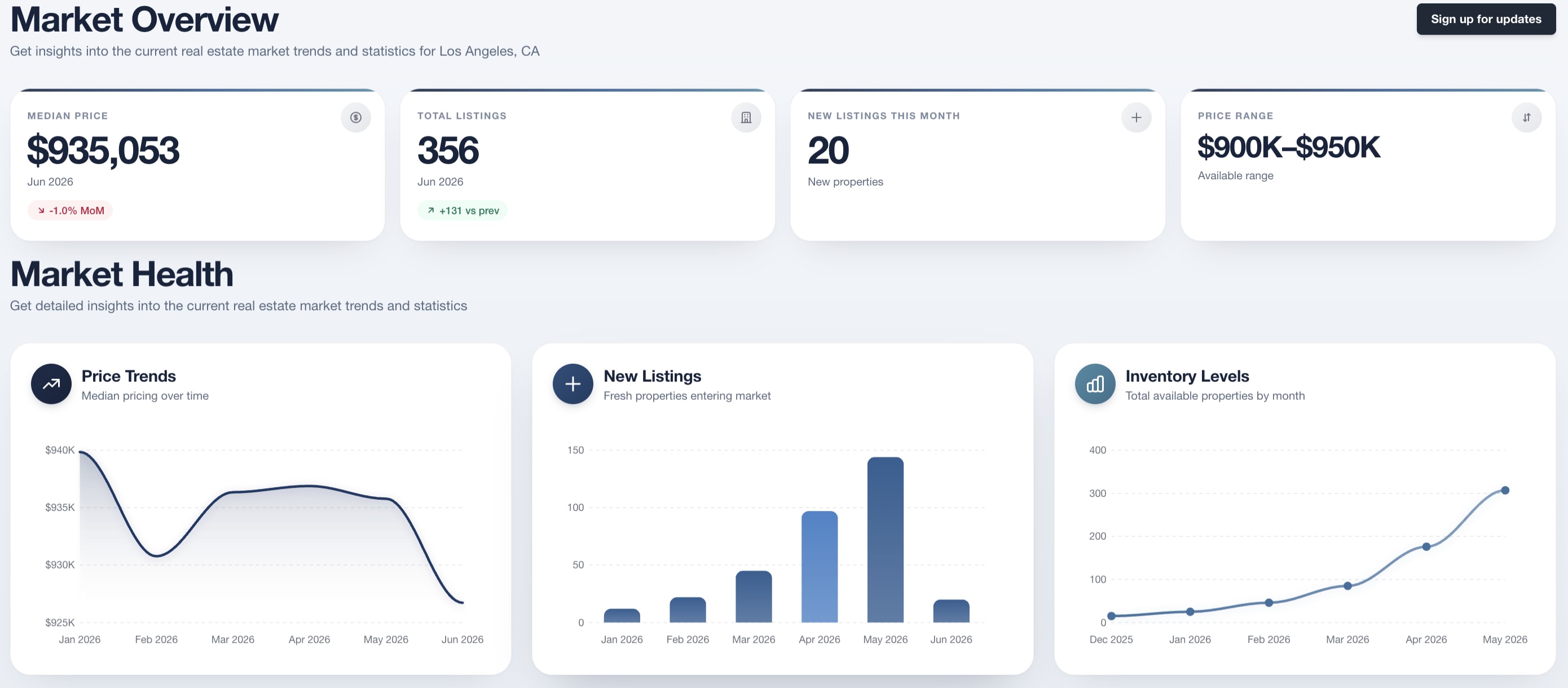
Show a Market's Stats Anywhere on Your Site

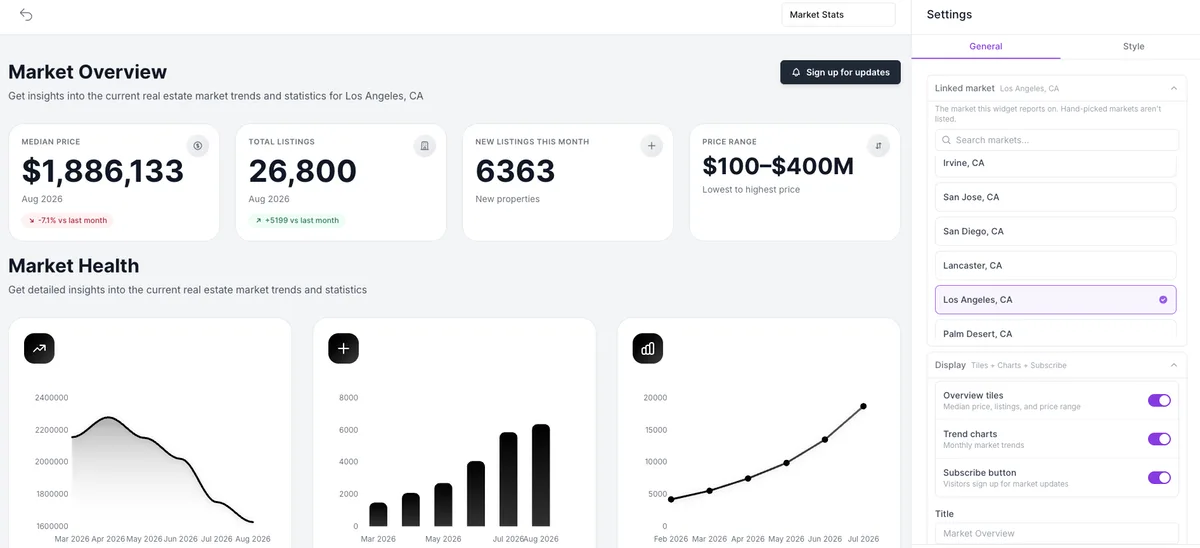
There's a new Market Stats widget in the Widget builder. Pick one of your saved Markets and it shows that market's numbers on their own: median price, total listings, new listings this month, and price range, plus the monthly trend charts. There's no listings gallery under it, so it fits in a sidebar or a homepage section where a full search block wouldn't. Leave the subscribe button on and the visitors following that area still reach you as leads.

  • New Market Stats widget in the Widget builder: the median price, total listings, new listings, and price range tiles for one saved Market, with its monthly trend charts
  • Choose the Linked market from a searchable list of the Markets you saved
  • The Style tab starts from your account's Markets colors, and you can override them for this widget alone
The Widget builder editing a widget named Market Stats. The preview on the left is headed Market Overview, with the line Get insights into the current real estate market trends and statistics for Los Angeles, CA, and a black Sign up for updates button on the right. Four stat tiles run below it: Median Price, $1,886,133 for Aug 2026, tagged 7.1% down vs last month; Total Listings, 26,800 for Aug 2026, tagged up 5199 vs last month; New Listings This Month, 6363 new properties; and Price Range, $100-$400M, lowest to highest price. A Market Health section follows, subtitled Get detailed insights into the current real estate market trends and statistics, holding three chart cards: a line chart of median price falling from about 2,250,000 in April 2026 to 1,650,000 in August 2026, a bar chart of new listings climbing month by month from March to August 2026, and a line chart of total listings rising from about 5,000 in February 2026 to 19,000 in July 2026. The Settings panel on the right sits on the General tab, beside a Style tab. Its Linked market section reads Los Angeles, CA, with the note that this is the market the widget reports on and that hand-picked markets aren't listed, a Search markets field, and a list of Irvine, San Jose, San Diego, Lancaster, Los Angeles, highlighted in purple and check-marked, and Palm Desert. Under it a Display section, summarised as Tiles plus Charts plus Subscribe, holds three toggles, all switched on: Overview tiles, for median price, listings, and price range; Trend charts, for monthly market trends; and Subscribe button, so visitors sign up for market updates. Below them an empty Title field shows the placeholder Market Overview
feature

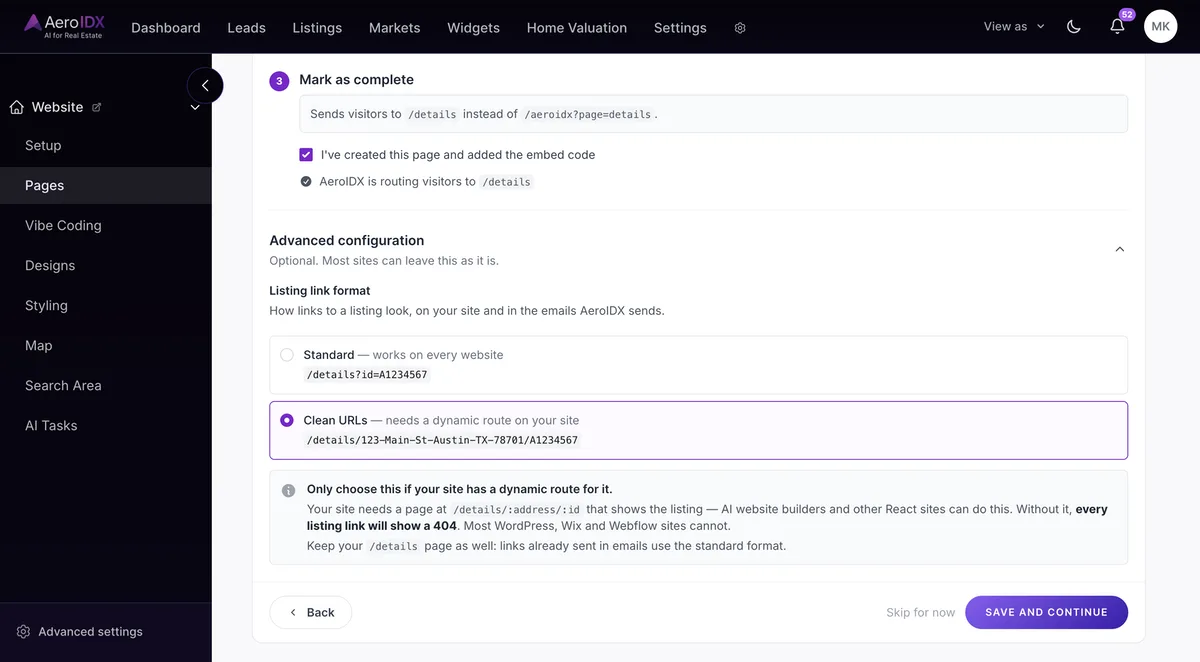
Install AeroIDX from the GoHighLevel Marketplace

AeroIDX is now listed in the GoHighLevel Marketplace. Install it from your account and your website becomes a full IDX site: buyers search live MLS listings on your own domain and save what they find. When one of them asks for a valuation or books a showing, that request lands as a contact in the CRM you already work in, and the follow-up runs from there. Installing the app is free. The IDX itself runs on your AeroIDX plan.

  • Live MLS property search on your own domain, showing what is on the market right now
  • Map search. Buyers pan around a neighborhood and draw their own search area on the map
  • Saved searches. A buyer saves what they are after and comes back when something new matches it
  • Home valuation tool. The homeowner gets an instant estimate. You get their name and number
  • Lead capture across the whole site. A showing request, a listing inquiry or a valuation all arrive as contacts, and your workflows pick them up from there
  • Automatic property alerts. Your buyers hear about a new match, a price drop or a status change without you writing the email
  • Full activity history on the contact. You can see what a lead searched for, what they saved and which listings they opened, all before you pick up the phone
  • Team routing. Each agent connects their own account and gets their own leads
  • Setup handled for you. Pick a plan, we connect your MLS once, and you link your CRM. After that the search and the follow-up are already running. See the plans →
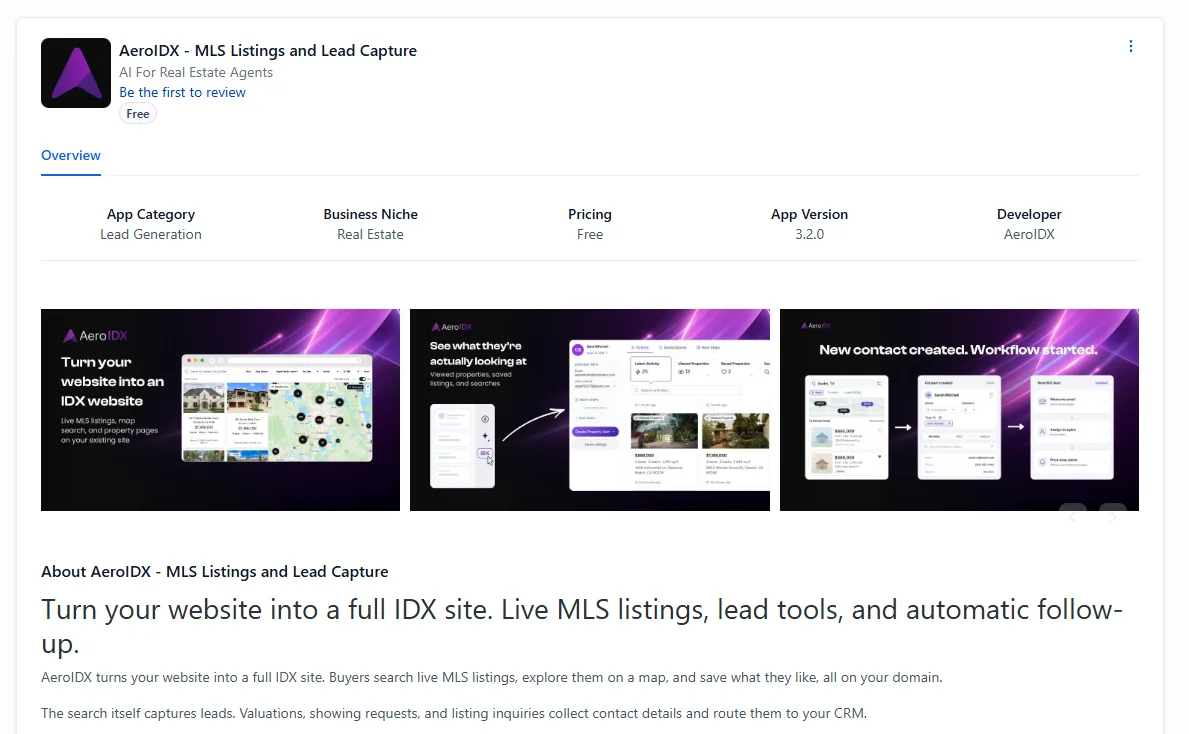
The AeroIDX listing in the GoHighLevel Marketplace. At the top left, a black tile holding the purple AeroIDX arrow mark sits beside the app name, AeroIDX - MLS Listings and Lead Capture, with the line AI For Real Estate Agents under it, a blue Be the first to review link, and a grey Free pill. An Overview tab is selected below. A row of five labelled facts follows: App Category, Lead Generation; Business Niche, Real Estate; Pricing, Free; App Version, 3.2.0; Developer, AeroIDX. Under it runs a carousel of three dark purple promotional cards. The first reads Turn your website into an IDX website, with the subline Live MLS listings, map search, and property pages on your existing site, beside a browser window showing a property search with listing photos and a map of pins. The second reads See what they're actually looking at, subtitled Viewed properties, saved listings, and searches, with an arrow running from a small collapsed panel to an expanded lead record for Sarah Mitchell showing her latest activity, 25 viewed properties, 13 listings and 3 saved properties, over two property cards priced at $865,000 and $1,199,000. The third reads New contact created. Workflow started, and shows three linked panels: a new lead in Austin, TX with two saved listings, a contact created entry with the lead's details, and a workflow panel listing a welcome email, an assign to agent step and price drop alerts. Below the carousel, a heading reads About AeroIDX - MLS Listings and Lead Capture, followed by the line Turn your website into a full IDX site. Live MLS listings, lead tools, and automatic follow-up, and two paragraphs of body copy
feature

Run More of Your Account through the MCP

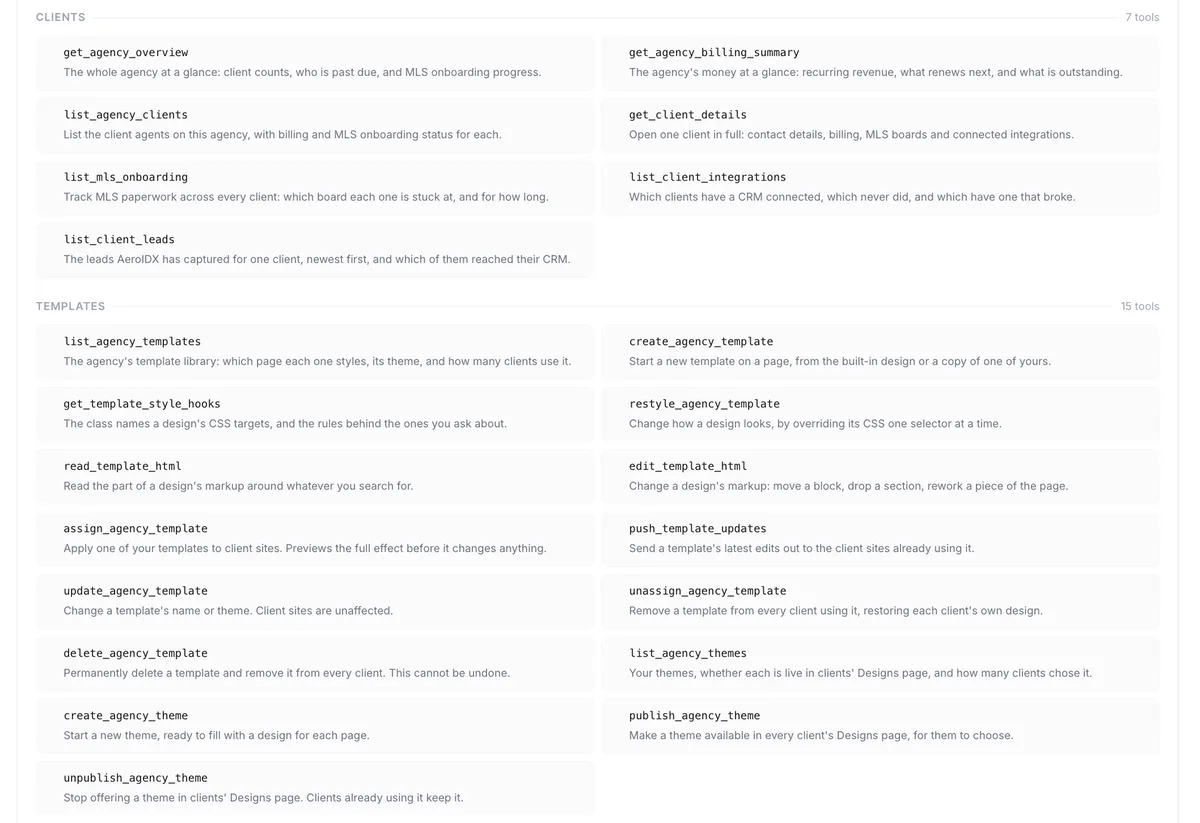
The AeroIDX MCP gains twenty-seven new tools. Your AI changes the setting itself instead of describing it and pointing you at the screen.

  • Website designs list and apply, so your AI can switch the whole look
  • Component styling and the listing page layout both read and write, so your AI can restyle a card or reorder the listing page without you opening the editor
  • Advanced filters and property types answer what your search is set to today, and change it
  • Lead registration and lead routing read and write, so your AI can change who gets the next lead
  • Email delivery and schedules both read and write. Delivery adds a test send, so your AI can change a setting and confirm the mail still arrives
  • API keys: list them, create one, delete one
  • Facebook ad feeds get four tools: read your feeds, create one, deactivate it, and swap which listings it carries
  • The pages wizard is the one read-only surface. Your AI can report how your pages are set up but not change them
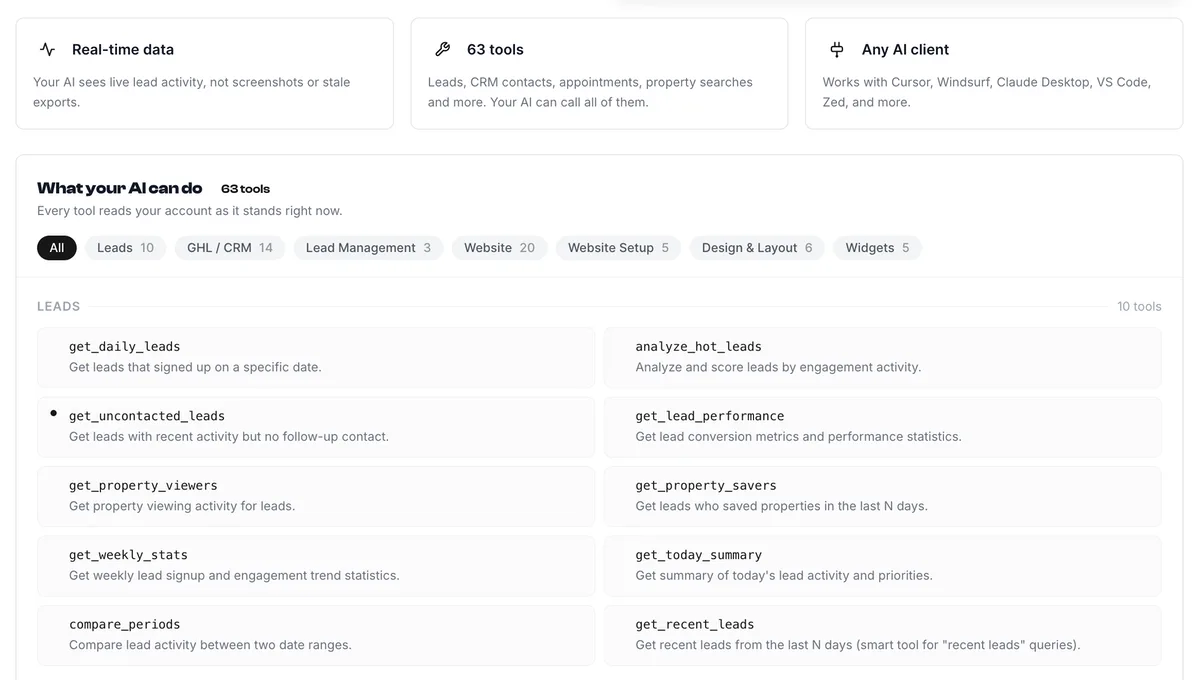
The What your AI can do panel on the AeroIDX MCP page, headed 63 tools. Three cards sit above it. Real-time data says your AI sees live lead activity, not screenshots or stale exports. 63 tools lists leads, CRM contacts, appointments, property searches and more, and notes your AI can call all of them. Any AI client names Cursor, Windsurf, Claude Desktop, VS Code and Zed. Under the panel heading a line reads Every tool reads your account as it stands right now, above a row of filter pills carrying counts: All, which is selected, then Leads 10, GHL / CRM 14, Lead Management 3, Website 20, Website Setup 5, Design & Layout 6, and Widgets 5. Below the pills the LEADS group is open, marked 10 tools, and shows ten cards in two columns, each a monospace tool name over a one-line description. get_daily_leads gets leads that signed up on a specific date. analyze_hot_leads analyzes and scores leads by engagement activity. get_uncontacted_leads gets leads with recent activity but no follow-up contact. get_lead_performance gets lead conversion metrics and performance statistics. get_property_viewers gets property viewing activity for leads. get_property_savers gets leads who saved properties in the last N days. get_weekly_stats gets weekly lead signup and engagement trend statistics. get_today_summary gets a summary of today's lead activity and priorities. compare_periods compares lead activity between two date ranges. get_recent_leads gets recent leads from the last N days
feature

Open the Plugin and See What's Still Waiting on You

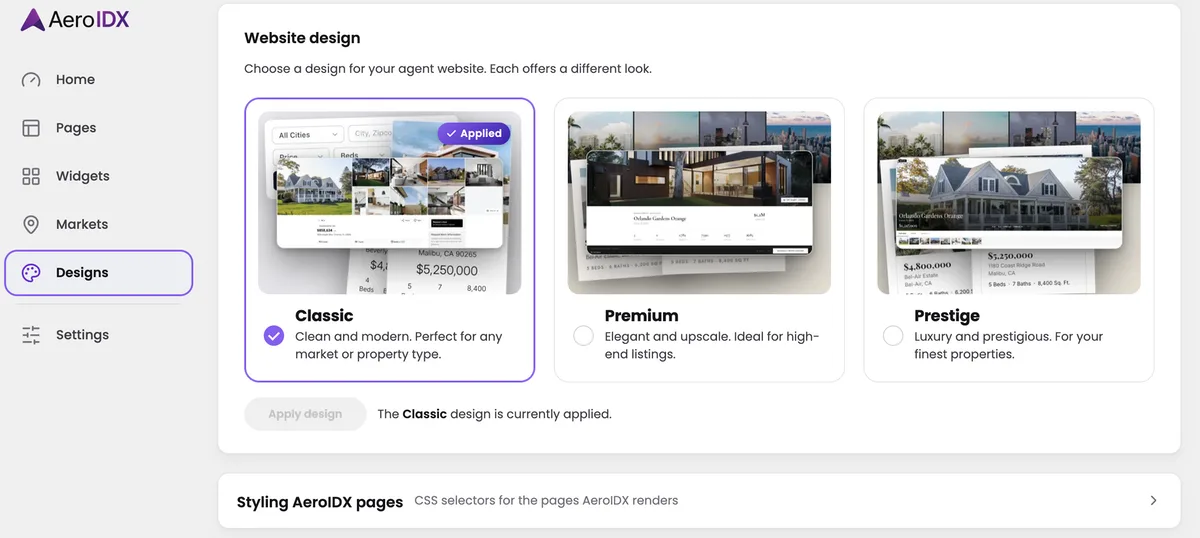
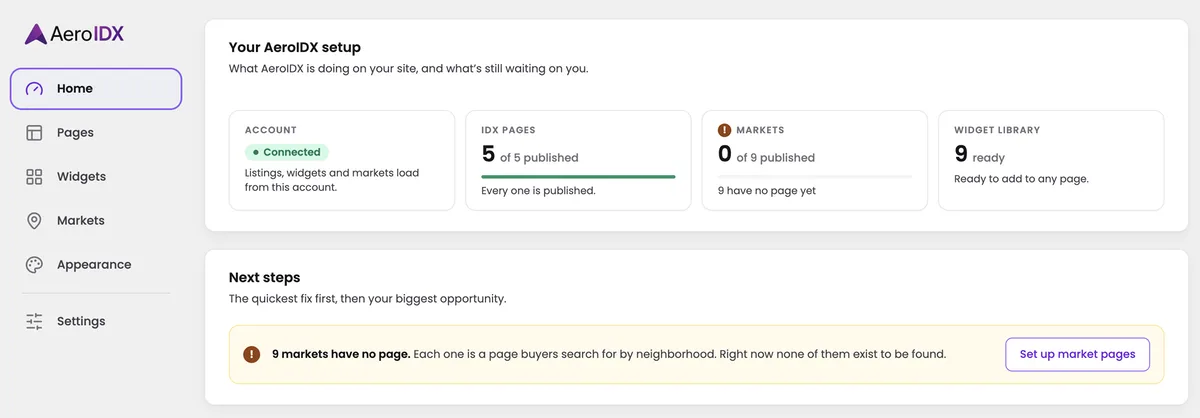
The plugin admin got a redesign, and it now opens on a Home screen instead of a settings form. Home tells you where your setup stands: the account, your IDX pages, your market pages, and your widget library, each one a card with its own count. Under that, Next steps names the one thing worth fixing first and hands you the button to go do it. The old nested menu is gone, so the sidebar is now Home, Pages, Widgets, Markets, Appearance, and Settings.

  • Home sums up your setup in four cards before you click anything
  • Next steps names the quickest fix first, then your biggest opportunity, each with its own button
  • Pages lists every IDX page with its URL and whether it is live, and marks the listing and agent pages as built in, because those never needed a WordPress page
  • Widgets opens on Create, where all nine types show what they render before you pick one
  • Appearance is brand new: every CSS selector AeroIDX renders, each with a copy button
  • Settings is down to the API key, the plan it unlocked, and when it was last verified
The Home screen of the redesigned AeroIDX WordPress plugin admin. The sidebar carries the AeroIDX logo above six items: Home, which is selected, then Pages, Widgets, Markets, a divider, Appearance, and Settings. The main area is headed Your AeroIDX setup, under a line reading what AeroIDX is doing on your site, and what's still waiting on you. Four cards sit below it. Account shows a green Connected pill and the note that listings, widgets and markets load from this account. IDX Pages reads 5 of 5 published above a full green progress bar, with Every one is published underneath. Markets carries a warning icon and reads 0 of 9 published above an empty bar, with 9 have no page yet underneath. Widget Library reads 9 ready and says they are ready to add to any page. A second panel below is headed Next steps, under the line the quickest fix first, then your biggest opportunity, and holds one yellow banner reading 9 markets have no page, each one a page buyers search for by neighborhood, and right now none of them exist to be found. A Set up market pages button sits at the banner's right edge
feature

Move the Listings Around Your Map Search

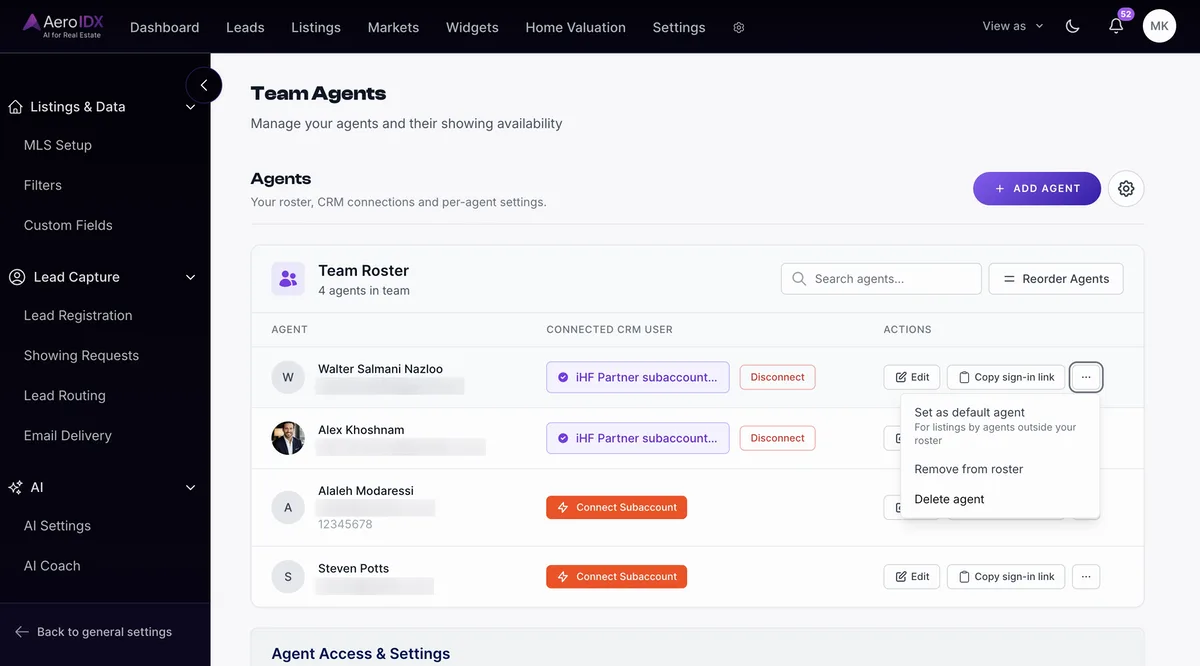
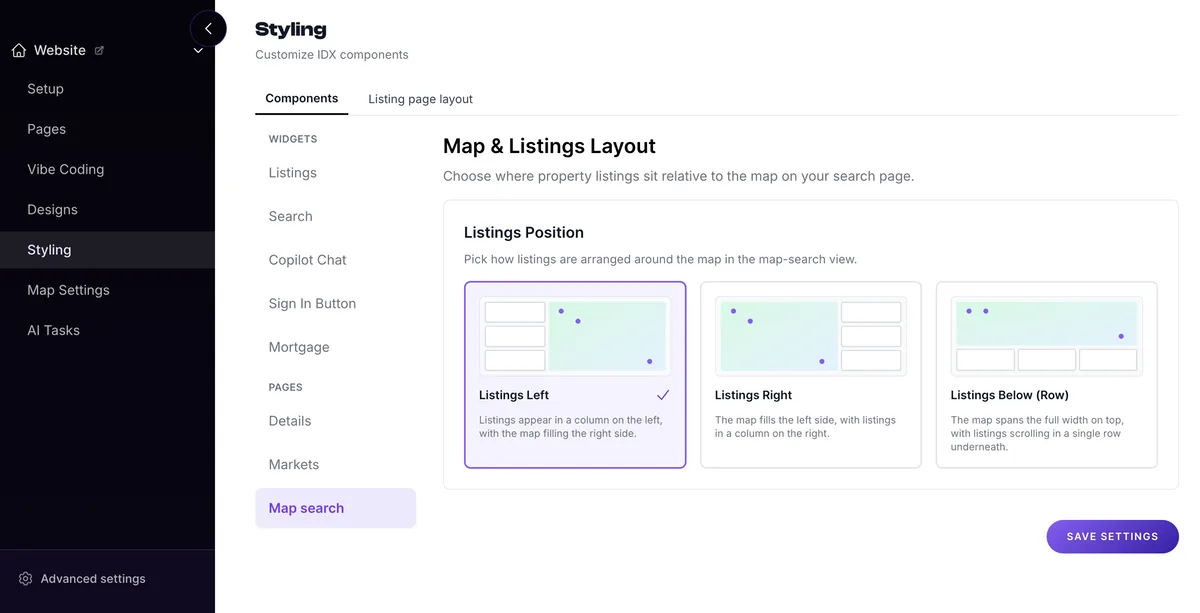
Your map search page no longer has to keep the listings on the left. A new Map & Listings Layout setting lets you put them somewhere else: a column on the left, a column on the right, or a row under a map that runs the full width. Set it in Settings → Styling → Map search, hit save, and the search page picks it up whatever theme the site is built on.

  • Leave it on Listings Left and nothing moves: a column of listings on the left, the map filling the right
  • Switch to Listings Right and the two swap places, so the map opens on the left instead
  • Choose Listings Below (Row) and the map spans the full width, with the listings scrolling in one row under it
  • Every AeroIDX theme reads the setting, so you can move the listings without switching designs
The AeroIDX Styling page on the Map search tab, open on a Map & Listings Layout section. Under a Listings Position heading are three cards, each with a small diagram of the layout it produces: Listings Left, ticked, with a column of listings beside a map that fills the right; Listings Right, with the map on the left and the listings down the right; and Listings Below (Row), with a full-width map above a row of listings. A Save Settings button sits below the cards
feature

Choose Which IDX Activity Lands on Your GoHighLevel Contacts

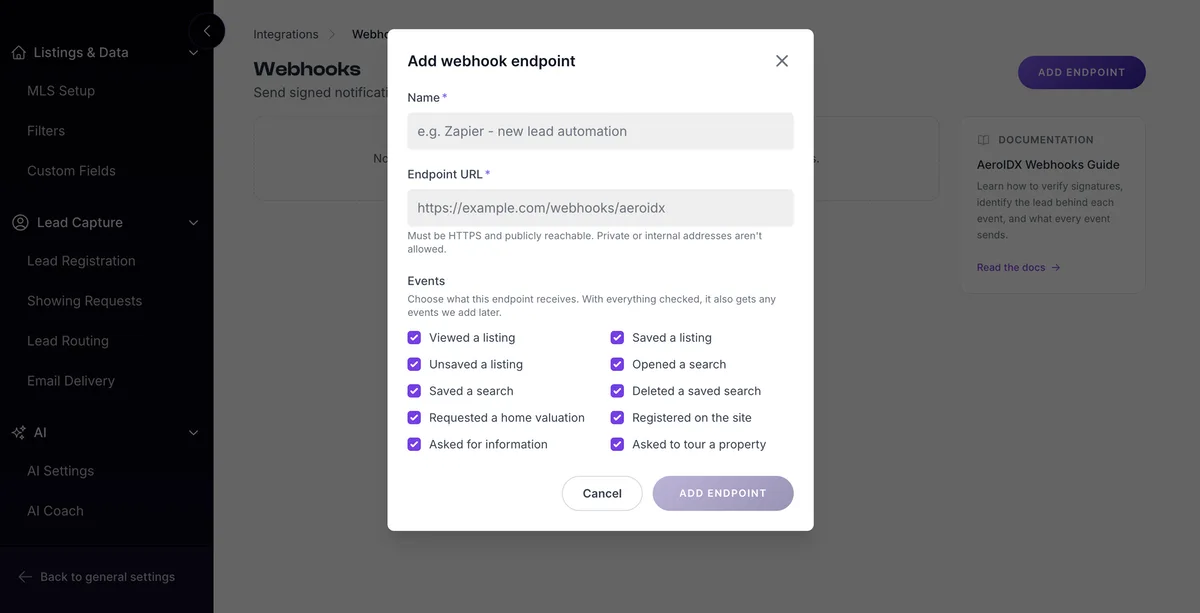
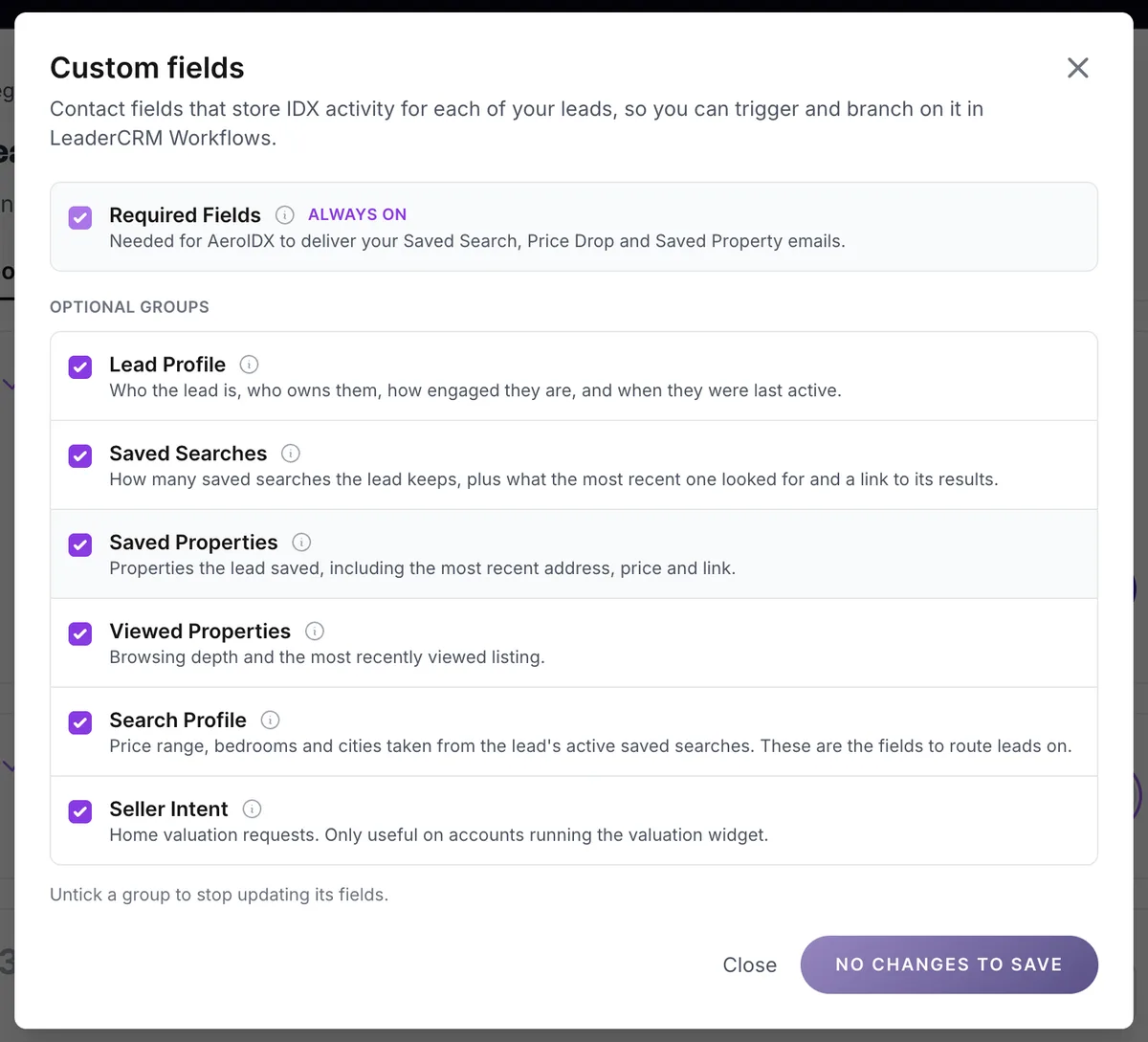
AeroIDX writes your leads' IDX activity onto their GoHighLevel contact record, so a Workflow can trigger and branch on it. Those fields are now grouped, and you choose which groups AeroIDX keeps updating. The ones that deliver your Saved Search, Price Drop and Saved Property emails stay on. Untick any of the rest and AeroIDX stops updating those fields.

  • Required Fields stay on. AeroIDX needs them to deliver your Saved Search, Price Drop and Saved Property emails
  • Lead Profile writes who the lead is, who owns them, how engaged they are and when they were last active
  • Saved Searches writes how many the lead keeps, what the most recent one looked for, and a link to its results
  • Saved Properties writes what the lead saved, including the most recent address, price and link
  • Viewed Properties writes how far the lead browsed and the last listing they opened
  • Search Profile writes price range, bedrooms and cities from the lead's active saved searches. Route your leads on these
  • Seller Intent writes home valuation requests. Leave it off unless you run the valuation widget
The Custom fields dialog in AeroIDX. Under the heading, a line reads Contact fields that store IDX activity for each of your leads, so you can trigger and branch on it in LeaderCRM Workflows. A ticked Required Fields row is marked ALWAYS ON and says they are needed for AeroIDX to deliver your Saved Search, Price Drop and Saved Property emails. Below it, under OPTIONAL GROUPS, six ticked rows each carry a description: Lead Profile, who the lead is, who owns them, how engaged they are and when they were last active; Saved Searches, how many saved searches the lead keeps plus what the most recent one looked for and a link to its results; Saved Properties, properties the lead saved including the most recent address, price and link; Viewed Properties, browsing depth and the most recently viewed listing; Search Profile, price range, bedrooms and cities taken from the lead's active saved searches, noted as the fields to route leads on; and Seller Intent, home valuation requests, only useful on accounts running the valuation widget. A line under the list reads Untick a group to stop updating its fields, above a Close link and a purple button reading NO CHANGES TO SAVE
feature

Recommend AeroIDX and Get Paid Every Month

The AeroIDX Partner Network is open. Agree to the terms from your account and your referral link is ready. Anyone who subscribes through it earns you a share of what they pay, every month they stay. Joining is free and there is no quota to hit. Bring in more qualifying accounts and your rate goes up.

  • Join free and get your link right away. Agree to the Partner Network Terms and hit Start Earning
  • 10% at two to four Qualifying Accounts, 20% at five or more. The higher rate applies across every qualifying account you referred, including the ones that got you there
  • Recurring, with no twelve-month commission cap, for as long as the customer stays subscribed and attributed to you. A new account starts earning after its first thirty days
  • 3% on the partners you bring in, once they reach two Qualifying Accounts of their own
  • Paid on the 25th for the previous month, once your balance reaches $500. A smaller balance carries forward to the next payout
  • Referred accounts have to be in a Partner Pilot MLS area to earn, so check the board before you refer. See how the program works →
The AeroIDX Partner Network signup screen on a white card. The heading reads Recommend AeroIDX. Get paid every month, above a line saying you get a referral link and anyone who subscribes through it earns you a share of what they pay, every month they stay. Under that is an unchecked box reading I have read and agree to the AeroIDX Partner Network Terms, with the terms as a purple link, and a purple START EARNING button below it. On the right is a silver hexagonal badge with the purple AeroIDX arrow mark, the AeroIDX wordmark, and the word PARTNER. Past a divider, a section titled It's easy to get started has three steps, each under a line icon. Step 1, Join, it's free, says you get your referral link right away, that joining costs nothing and that there is no quota to hit. Step 2, Share your link, says to send it to the agents and audiences you already reach, and that every account signing up through it is credited to you. Step 3, Earn every month, says you earn on every payment your referrals make for as long as they stay, and that bringing in more moves the rate up
feature

Give Every Market Its Own Page in WordPress

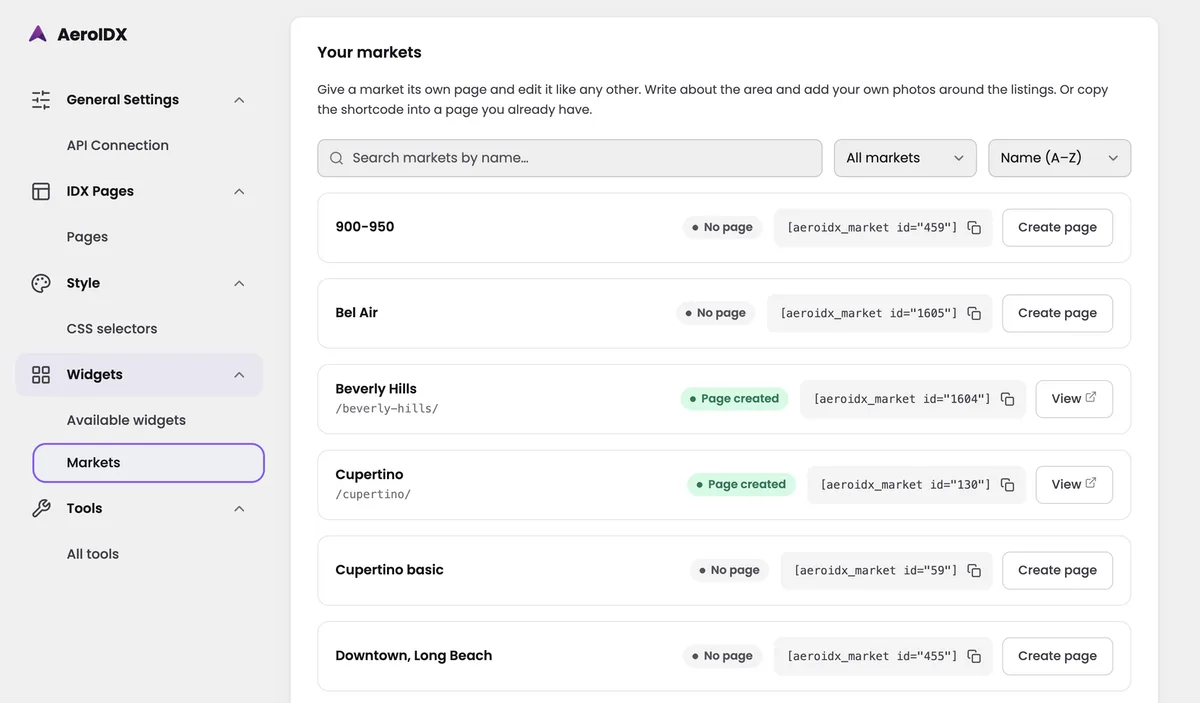
Every market on your account now shows up inside the plugin. Turn one into a WordPress page and it behaves like any other, so you can introduce the area in your own words and put your own photos around the listings. If that area already has a page, the shortcode drops the same listings into it.

  • Search by name, filter, or sort A to Z to find one in the list
  • Create page builds the WordPress page for you, already pointed at that market's listings
  • Copy the shortcode into a page you already built, and the market's listings show up there
The Your markets screen in the AeroIDX WordPress plugin admin. The sidebar lists General Settings with API Connection, IDX Pages with Pages, Style with CSS selectors, Widgets with Available widgets and Markets selected, and Tools with All tools. A note at the top says to give a market its own page and edit it like any other, writing about the area and adding your own photos around the listings, or to copy the shortcode into a page you already have. Below it sit a Search markets by name box, an All markets filter, and a Name A to Z sort. Each market is a row with its name, a status pill, its shortcode with a copy button, and an action button: 900-950 reads No page with the shortcode aeroidx_market id 459 and a Create page button, Bel Air reads No page, Beverly Hills reads Page created with the URL slash beverly-hills under its name and a View button, Cupertino reads Page created with slash cupertino, and Cupertino basic and Downtown, Long Beach both read No page
feature

Import Your Leads From a CSV File

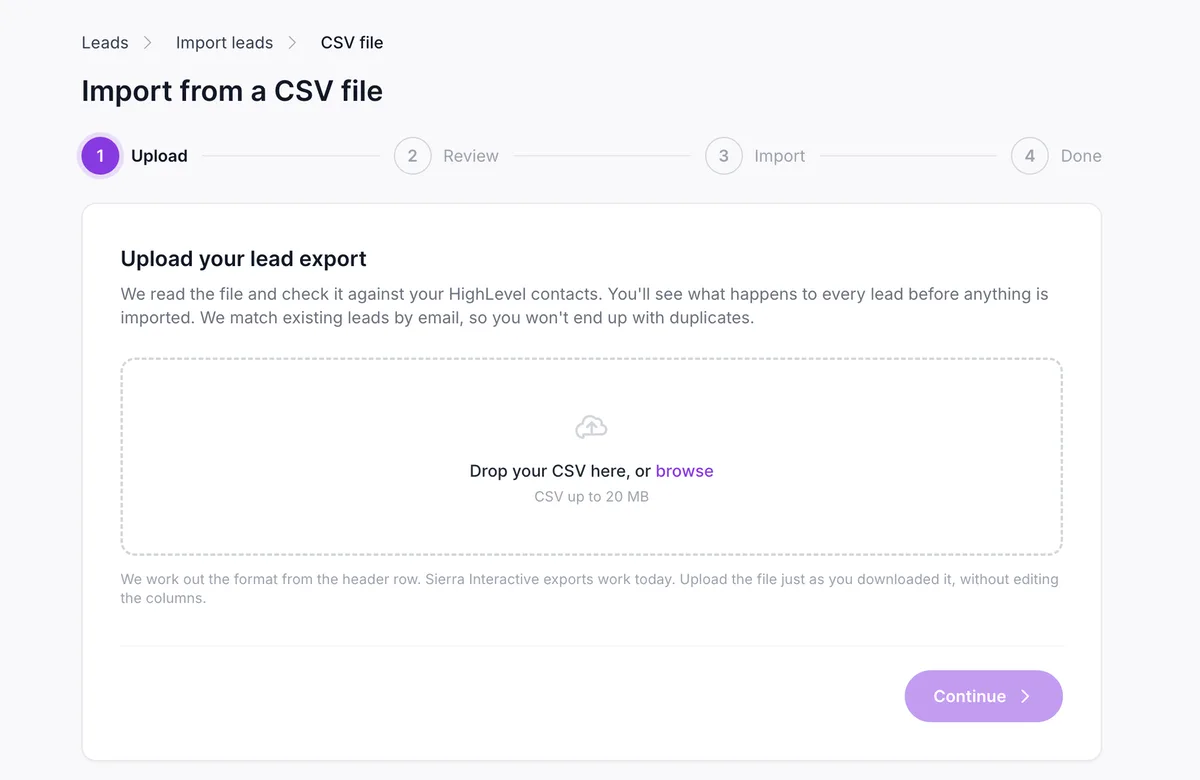
Bring your leads over from a CSV export. Upload the file exactly as you downloaded it and we read the header row to work out the format, so there is nothing to map by hand. Nothing imports until you have seen it: the review step tells you what will happen to every lead, and you can still back out. We match on email, and a second run won't leave you with duplicates.

  • We work out the format from the header row, so you can upload what you downloaded without touching the columns
  • Review the file before it imports and see what happens to every lead while you can still back out
  • We check it against your HighLevel contacts and match existing leads by email. Run it twice and you still won't get duplicates
  • Find it under Leads → Import leads → CSV file
The Import from a CSV file screen in AeroIDX, on step 1 of 4 (Upload, Review, Import, Done), with a drop zone reading Drop your CSV here, or browse, a CSV up to 20 MB limit, and a note that the format is worked out from the header row with Sierra Interactive exports supported
performance

Faster IDX Pages and Widgets

Your listings show up sooner on IDX pages and widgets, on phones and on computers. Search results and listing detail pages gained the most. Market pages also hold their place while they load, so the content under them stops sliding down.

feature

Build and Edit Widgets Without Leaving WordPress

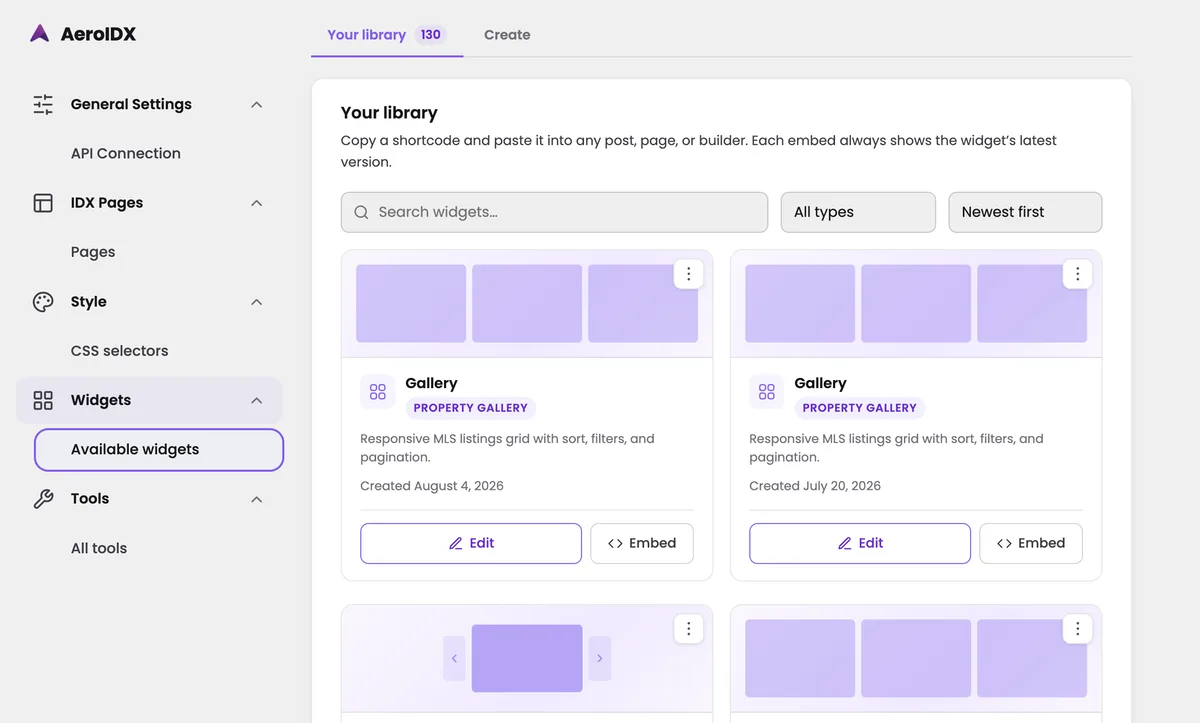
The Widgets screen in the plugin is now a full widget builder. Create a widget, edit one you already have, and copy its shortcode without opening a second tab. Your library is one grid you can search, filter, and sort, and each embed pulls the widget's latest version, so one edit updates it everywhere you pasted the shortcode.

  • Create a widget from the new Create tab, right inside the WordPress admin
  • Edit any widget from Your library without going back to the AeroIDX dashboard
  • Search by name, filter by type, or sort with Newest first to find a widget in the grid
  • Copy a shortcode from a card and paste it into any post, page, or builder
The AeroIDX WordPress plugin admin on the Available widgets screen. The sidebar lists General Settings with API Connection, IDX Pages with Pages, Style with CSS selectors, Widgets with Available widgets selected, and Tools with All tools. The main area shows a Your library tab reading 130 next to a Create tab. Under it, a note says to copy a shortcode and paste it into any post, page, or builder, and that each embed always shows the widget's latest version. A row below that holds a widget search box, an All types filter, and a Newest first sort. The grid underneath shows widget cards, each with a purple layout preview, the name Gallery, a Property Gallery badge, the description Responsive MLS listings grid with sort, filters, and pagination, a created date, and Edit and Embed buttons
feature

Cut Areas Out of a Map Search

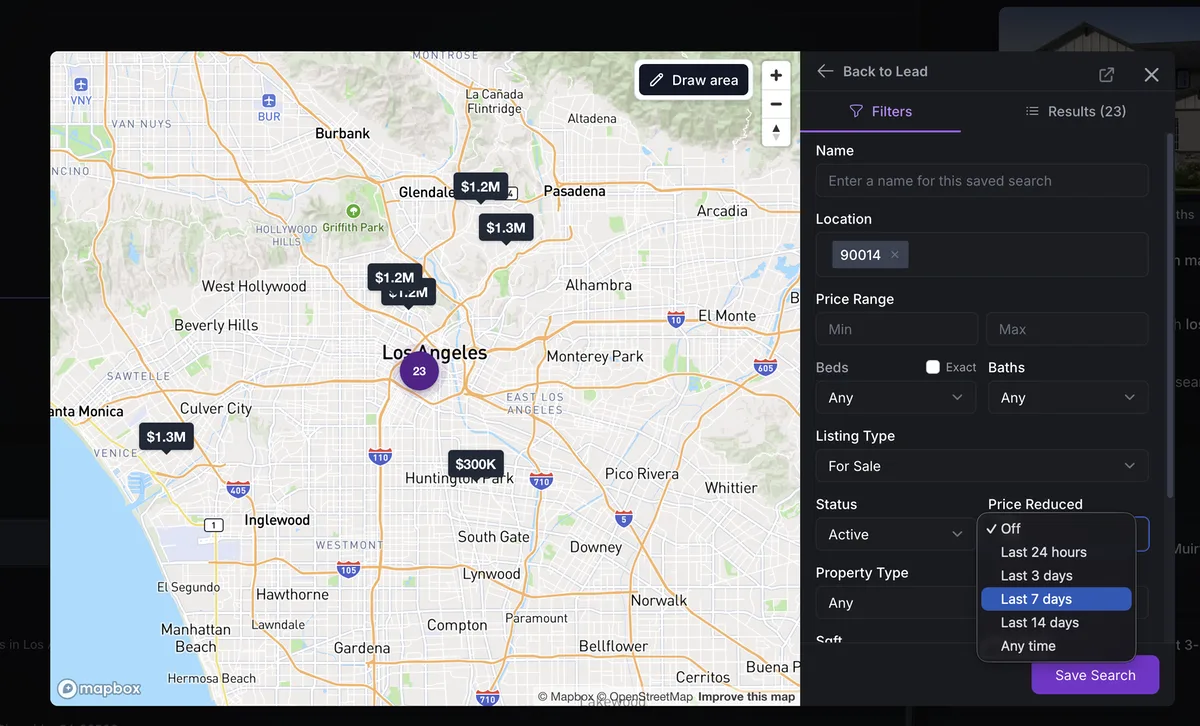
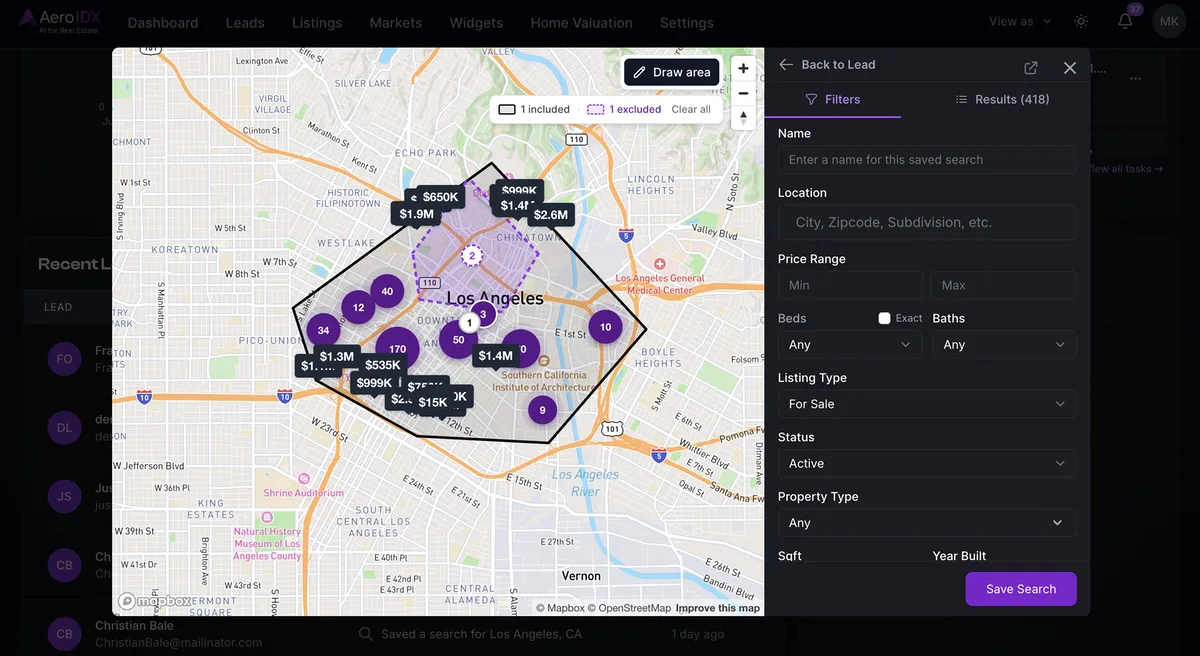
The shapes you draw on a map can now take listings out as well as bring them in. Draw your neighborhood, then draw an excluded area over the highway corridor, or over the block a buyer already ruled out, and the listings inside it drop from the results.

  • Draw an excluded area over an included one and the listings inside it drop out of the results
  • Use as many shapes as you need, so you can stack several included areas and cut more than one hole out of them
  • A counter above the map tracks how many areas are included and excluded, with Clear all to start over
  • Works on the map search and on the maps inside the app, so an exclusion drawn on a saved search stays with that search
The map search open over a lead's saved search. A map of Los Angeles shows a large area drawn with a solid black outline, and inside it a smaller area drawn with a dashed purple outline covering Chinatown and the blocks north of downtown. Above the map, a counter reads 1 included, 1 excluded, with a Clear all link and a Draw area button. On the right, the Filters panel for the saved search shows Name, Location, Price Range, Beds and Baths, Listing Type set to For Sale, Status set to Active, and Property Type, with the Results tab reading 418
feature

Put a Filter Bar on Any Market

Markets can now show a filter bar above the listings. Flip on Show Filter Bar when you create or edit a Market, and visitors can narrow what they see by property type, price, beds, and baths right there on the page. They can re-sort the list or jump to the map view from the same row of controls, so a Market page now does the work people used to leave for a search page.

  • Visitors filter by property type, buy or rent, status, price, beds, and baths, plus a More menu for the rest
  • The same bar handles sorting and the map view, so people can rearrange the page to suit themselves
  • Reset puts everything back to the Market you built
A Market page with the filter bar turned on. Three market charts run across the top, then a heading reading 100+ Properties Available, and under it a row of controls: Reset, Property Type, For Sale, Active, $0+, Beds & Baths, More, a Newest Listings sort menu, and buttons for the grid and map views. Below the bar sit four listing cards for Los Angeles homes in 90077, each tagged New and showing the price, beds, baths, square footage, and the offering brokerage
feature

Bring Your IDX Broker Leads Into AeroIDX

You can now pull your leads out of IDX Broker and into AeroIDX with an API key. Their saved searches come across too, and those saved links become Markets. We match existing leads by email, so running the import twice will not leave you with duplicates. You can also fetch the list first and hand-pick who comes over.

  • Paste your IDX Broker API access key to bring your leads across. We store it encrypted and use it only for the migration
  • Turn your leads' saved-search links into Markets automatically
  • Review and select leads before importing, so you fetch the list first and pick only the ones you want
  • We match existing leads by email, so you can run it again for another IDX Broker account without duplicates
  • Find it under Leads → Import leads, or run it during onboarding if you are new here
The Import leads screen in AeroIDX with an IDX Broker API access key field, an Import saved links as Markets checkbox turned on, an Email me when it's done option, and Advanced options for reviewing and selecting leads before importing and pulling each lead's browsing history
feature

Design Property Websites with Your Own HTML & CSS

Property websites now come with a Custom CSS/HTML theme, right next to Warm Elegance and Luxury. Pick it and you author the full page yourself. It starts with a ready-made design you can edit or replace, and you drop in placeholder tokens so each property fills in its own price, address, and photos. Keep the lead form token on the page and visitors can still reach out to you.

  • Choose the new Custom CSS/HTML theme to author a full-page design in HTML and CSS
  • Start from a ready-made page, then edit it or replace it with your own
  • Drop in placeholder tokens like {{ price }}, {{ address }}, and {{ photo }}, and every listing renders with its own details
  • Keep the {{ lead_form }} token on the page to render AeroIDX's built-in lead-capture form
  • Bring a custom Google Font with a link at the top of your HTML, and split your styles into the Page CSS tab
The AeroIDX property website builder with the Custom CSS/HTML theme selected next to Warm Elegance and Luxury. Below, the Custom CSS/HTML editor shows Code and Preview toggles with HTML and CSS tabs, a Google Fonts link and spw-hero markup, and an Insert tokens panel listing property tokens like price, address, city, state, postal_code, and photo
feature

Stats & Subscriptions for Every Gallery Widget

Gallery widgets can now show live market statistics and a subscribe button right above your listings. Turn them on from the General tab in the Widget builder, and the stats and subscriptions always follow the gallery's current filters. Galleries you already built can take all of this in bulk from the Widgets page, without rebuilding anything.

  • Flip on Show market statistics to put price, inventory, and days-on-market charts above the gallery
  • Flip on Show subscribe button so visitors can follow the area, capturing them as leads
  • Stats and subscriptions always match the gallery's current filters, so the numbers reflect exactly what visitors are browsing
  • Add it to galleries you already built in bulk with Add stats & alerts on the Widgets page
The gallery Widget builder on the General tab, with the STATS & SUBSCRIBE section open on the right: a Show market statistics toggle and a Show subscribe button toggle, both turned on, and a note that stats and subscriptions match the gallery's current filters. The preview on the left shows a Market Overview with a Sign up for updates button, median price, total listings, new listings, and price range cards, plus Market Health charts above the listings
feature

Your Brand on Every Client Email

Agencies can now put their own brand on select emails AeroIDX sends to their clients. The new Email Branding tab in your agency dashboard lets you swap in your logo, your colors, and your footer, so those emails land in your client's inbox looking like they came from you, not from us.

  • Flip the Enable white-label toggle whenever you're ready; when it's off, clients keep getting the standard AeroIDX-branded emails
  • Set the header background, button, and accent colors used throughout each email
  • Add your logo to the email header banner, either by uploading an image or pasting a link
  • Customize the footer and sending details, and see which emails your branding applies to
The AeroIDX agency dashboard on the Email Branding tab, White-label section: an Enable white-label toggle turned on, color pickers for header background, accent, and button colors, and a logo uploader with Upload image and Paste link options, with Colors, Logo, Footer, Sending, and Emails sections in the sidebar
improvement

Make the Mortgage Calculator Match Your Brand

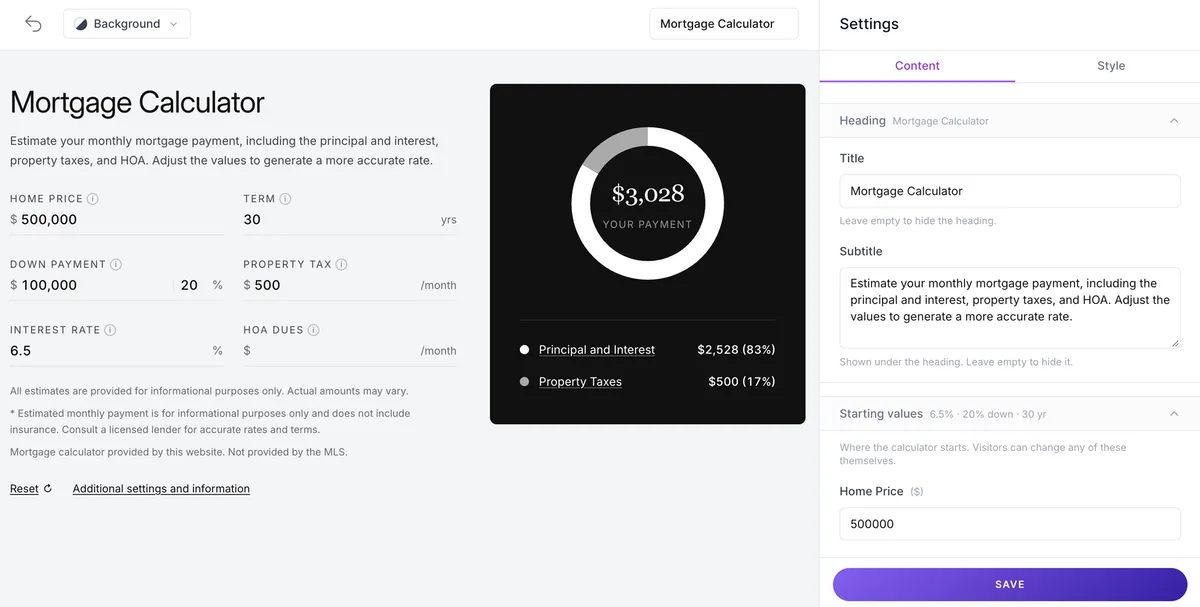
The mortgage calculator on your listing pages no longer has to wear our colors. Head to Settings → Styling → Mortgage and set your own accent and text colors, plus a color for each slice of the payment breakdown. A live preview shows exactly how the donut chart and legend will look before you save.

  • Set an accent color that drives the active payment card background and interactive highlights, plus your own text color
  • Pick a color for each payment segment: Principal & Interest, Property Taxes, and Insurance & HOA. Your picks apply to the donut chart, bars, and legends
  • A live preview updates as you type, so you can try shades without saving anything
The AeroIDX Styling page on the Mortgage tab showing Mortgage Calculator Colors: hex inputs for accent and text colors, three payment segment colors for Principal & Interest, Property Taxes, and Insurance & HOA, and a live preview of the payment donut chart showing a $2,450 monthly payment breakdown
improvement

A More Visual Way to Build and Preview Your Templates

Your themes now show a visual preview of every page design in a grid, so you can see each one at a glance instead of reading down a plain list. Inside the editor, preview your template at desktop, tablet, and mobile widths, pull in files as you build, clear the editor, or reset to the starter template at any time.

  • Preview your template at desktop, tablet, and mobile widths without leaving the editor
  • Bring your own files into a template as you build it
  • Clear the editor or reset to the starter template anytime to start fresh
The AeroIDX template editor in preview mode showing a Listing Details page rendered live. The toolbar has Code and Preview toggles plus desktop, tablet, and mobile view options at 1280px, and the preview below shows a property photo with a gallery thumbnail strip
feature

Custom Templates Now Cover Your Markets Pages

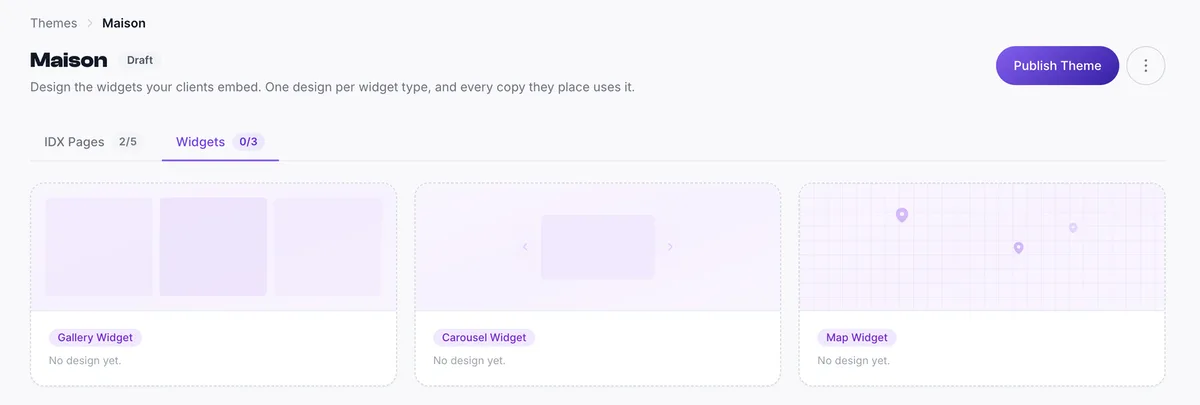
Your Markets pages join Listing Details and Search / Map as fully customizable IDX pages. Start from the AeroIDX default Markets design, then rewrite the HTML, CSS, and JavaScript to match your brand. Every stat card and section on the page is yours to change, and your design drops into your themes alongside the pages you already build.

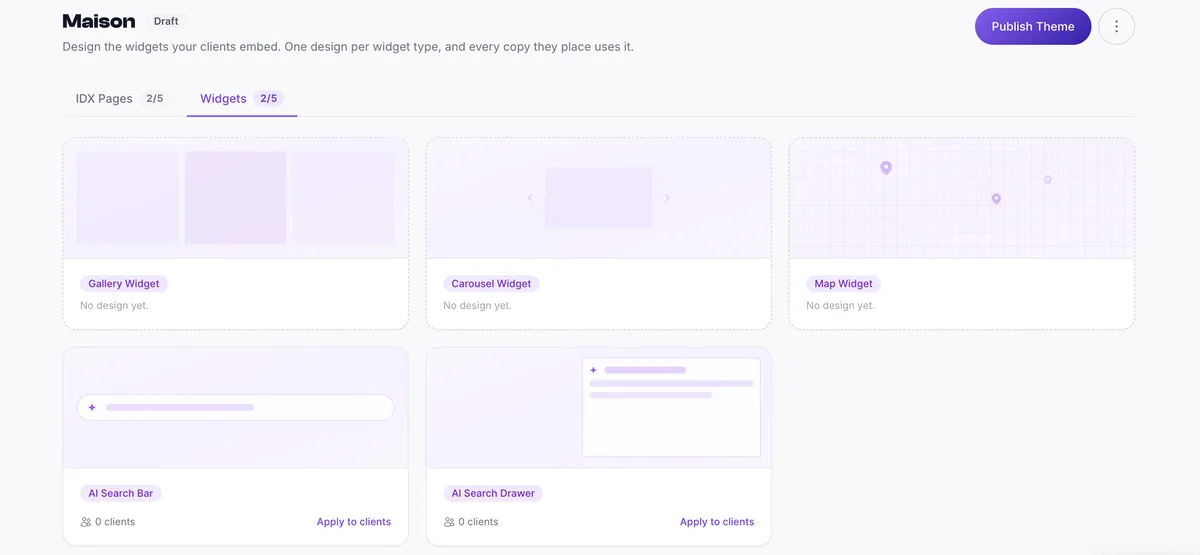
The AeroIDX theme builder showing the 'Maison' theme in Draft, with a card for each IDX page laid out in a grid: Listing Details, Markets, and Search / Map. The Markets card now offers a 'Create design' option, making it a customizable page alongside the others
feature

Show Off Client Reviews with the Testimonials Widget

There's a new Testimonials widget in the Widget builder. Add your clients' quotes, each with an author and location, and they rotate through a carousel you can embed anywhere on your site. Drag to reorder them, then open the Style tab to match the look to your brand.

  • New Testimonials widget in the Widget builder, a carousel of client quotes
  • Add each quote with an author and location, and drag to reorder them
  • Style it from the Style tab, then embed it anywhere on your site
The Testimonials widget builder, with a client-quote carousel preview on the left and the content editor showing quote, author, and location fields on the right
feature

Choose a Gallery Layout for Your Listings

Your listing photos now have their own gallery style. In your Website Styling settings, on the Widget colors tab under Details, you can keep the Theme default (Grid / Carousel) or switch to the new Mosaic gallery. These gallery options are only available on the classic theme.

  • New Image Gallery Settings in Styling let you choose how your listing photos are shown
  • Keep the Theme default (Grid / Carousel), or pick the new Mosaic gallery
  • The Mosaic gallery opens a full-screen photo grid when a visitor clicks any listing photo, so they can browse every image before opening one full size
A full-screen Mosaic gallery for a listing, showing an All Photos view with 30 property images arranged in a tiled grid
improvement

Cleaner, More Readable Listing Descriptions

Long listing descriptions used to show up as one dense wall of text. Now AeroIDX breaks them into clean, readable paragraphs, so buyers can scan them. The wording stays exactly as written; only the formatting improves, and it applies consistently across every listing.

  • Listing descriptions now render in clean, readable paragraphs instead of one dense block of text
  • Only the spacing changes, so your original wording stays exactly as written
  • The same formatting is applied automatically to every listing on your site
A property listing Description shown as several clean, well-spaced paragraphs beside the AI Summary panel
feature

APIs for Supplemental Listings

Manage your supplemental listings programmatically. New API endpoints let you create, read, and update a single listing, run batch operations across many at once, and import listings in bulk from a file. The import flow gives you a downloadable template, a preview step, and status tracking, so you can catch problems before a large import goes live.

feature

Custom Templates for Your IDX Pages

Take full control of your IDX pages from the Agency dashboard. Start from the AeroIDX default designs for the Listing Details and Search / Map pages, then rewrite the HTML, CSS, and JavaScript to match your brand. Group your designs into a theme, publish it so every client can pick it, or apply it to specific clients yourself.

  • Customize the full HTML, CSS, and JavaScript of your IDX pages, not just the styling
  • Start from AeroIDX's default templates for the Listing Details and Search / Map pages
  • Group one design per IDX page into a complete theme
  • Publish a theme so all your clients can select it, or apply it to specific clients yourself
AeroIDX Agency dashboard showing the 'Luxury' theme in Draft, with rows for the Listing Details page (applied to 1 client), Markets (not available yet), and Search / Map (no design yet), plus Rename and Publish Theme buttons
feature

Mortgage Calculator on Every Listing

Every Listing Details page now has an interactive mortgage calculator, so buyers can estimate their monthly payment without leaving your site. Pick your defaults, turn on an optional payment breakdown, and drag it wherever you want in the listing layout.

  • Adds an interactive mortgage calculator to every Listing Details page, with a donut chart that splits out principal, interest, and property taxes
  • Set your own defaults for down payment %, interest rate, and estimated tax rate under Styling → Mortgage Calculator
  • Falls back to your estimated tax rate when MLS data isn't available
  • Turn on the optional Payment Breakdown tab to show total interest, taxes, and HOA over the full loan term
  • Drag to reposition the calculator anywhere in the listing layout, or toggle it off entirely
AeroIDX Listing Details page showing the Mortgage Calculator: input fields for home price, term, down payment, property tax, interest rate, and HOA dues, next to a donut chart with the estimated monthly payment and a principal/interest/taxes breakdown
feature

Meet the Dream Neighborhood Widget

A new partner widget that drops an interactive neighborhood explorer straight into your listing pages: maps, schools, demographics, commute times, and local amenities. Buyers get the context they need on your site instead of bouncing to Zillow. As an AeroIDX client, you unlock 50% off your first subscription.

  • Add Dream Neighborhood from Widgets → New Widget, under the Other category
  • Embeds interactive maps, school ratings, demographics, commute times, and nearby amenities right into your IDX listing pages
  • Exclusive AeroIDX perk: 50% off your first subscription plus a waived activation fee, starting at $19.50/mo for Solo Agent
  • Works on both plans, Single Agent and Teams, with guided setup from our onboarding team
  • Try it on your listing pages. See everything it does →
AeroIDX Widgets page with the New Widget dialog open on the Other category, showing the Dream Neighborhood widget marked PARTNER: a location-pin icon, a From $19.50/mo price badge, an Available status, and a note that it is a paid add-on billed by Dream Neighborhood
feature

Track How Your Listings Perform

A new Analytics button on the Listings page shows impressions, property views, and clicks across your supplemental and featured listings, with a detailed report for each one.

  • Open Analytics from the Listings page to see impressions, property views, and clicks at a glance across all your listings
  • Switch the time range between 14, 30, 90 days, or All Time, and filter by Supplemental or Featured
  • Click Report on any listing for a detailed breakdown: search appearances, views, and saves vs. information requests
  • Download a PDF report for a single listing, or grab everything at once with Download All (ZIP)
Detailed Activity Report for the listing at 1530 Echo Park Avenue, Los Angeles, showing a Download Report button, a summary that the home appeared in 3 buyer searches, a 14/30/90-day time-range selector, and three metric cards for Impressions, Property Views, and Clicks
feature

Hand-Pick the Exact Listings in a Market

Pin specific listings to a Market by MLS number and it shows only those. Every price, bed, and property-type filter steps aside, so you control the exact lineup.

  • Pin listings by MLS # straight from the location search when you create or edit a Market, where each pin becomes a chip you can remove anytime
  • A pinned Market shows only the listings you chose and ignores the usual criteria filters, so you can build a curated collection by hand
  • Sold, Pending, and off-market listings stay visible when pinned, which is great for showcases and just-sold social proof
  • Your hand-picked set renders everywhere the Market appears: gallery, carousel, and embedded widgets
feature

AeroIDX, Now Native to WordPress

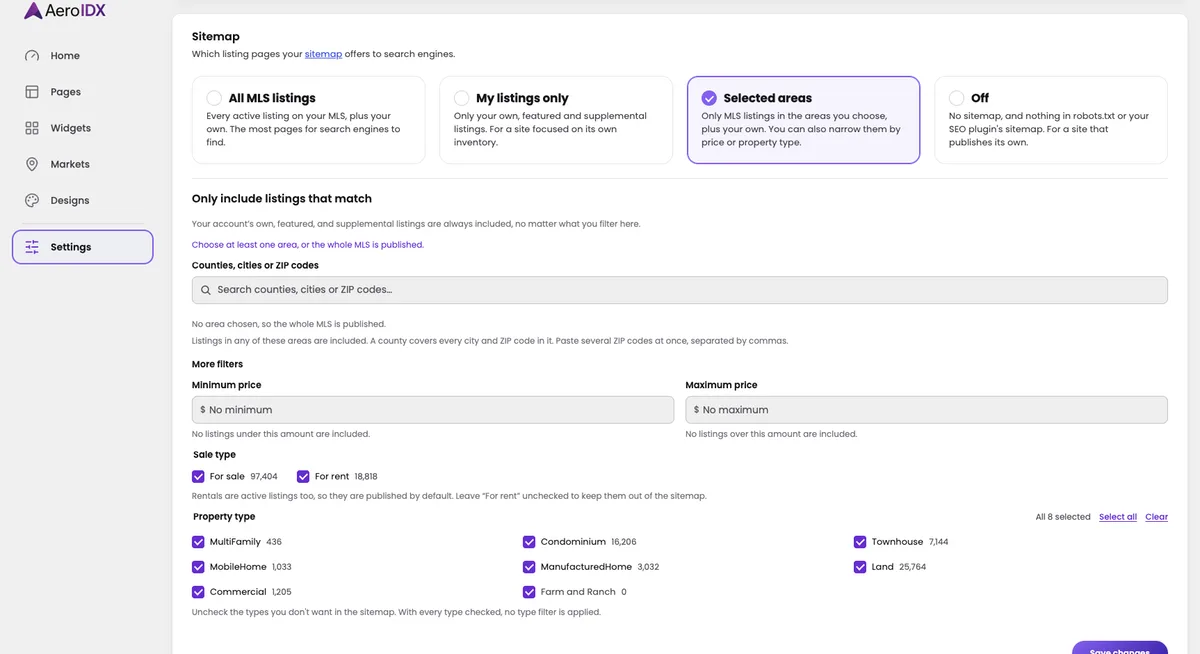
Run all of AeroIDX right inside WordPress. Our new plugin drops listings, search, and lead capture into your site, and you manage every piece of it from the WordPress admin you already know. It does not lock you into a theme.

  • Embed any AeroIDX widget through a simple shortcode: listings, search, maps, and more, placed anywhere on your site
  • Get SEO-ready listing and agent pages on clean URLs, auto-generated from your feed and built to be indexed by Google
  • Manage everything from a built-in WordPress admin, where widgets, IDX pages, and settings live alongside the dashboard you already use
  • Download the plugin and install it in minutes. See everything it does →
feature

New Showcase Slider Widget

A new widget that spotlights your listings one at a time in a full-width slider: a large property photo paired with the key details and a clear call to action.

  • Every slide pairs a large property photo with the address, price, beds, baths, and square footage
  • Built-in View Listing and View All calls to action on each slide
  • Filter by location, price, beds, baths, and property type, sort and limit results, or flip on Featured Listings to curate exactly what shows
AeroIDX Showcase Slider widget builder showing a featured listing with a large property photo on the left and the address, price, beds, baths, and square footage on the right, with View Listing and View All buttons
feature

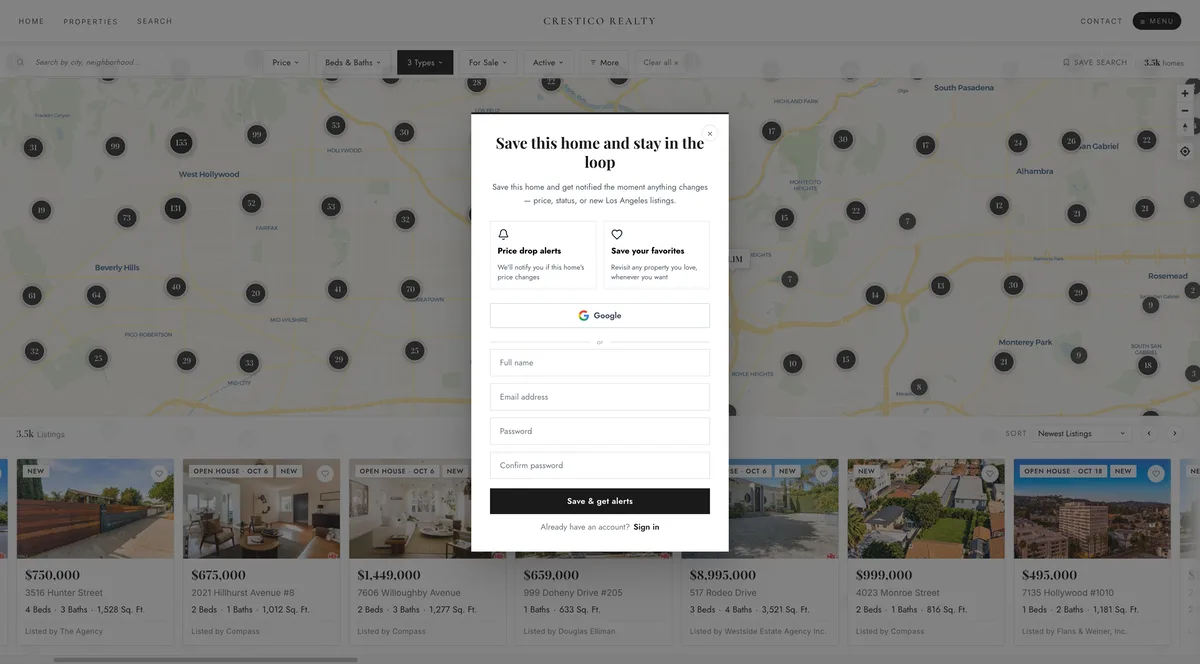
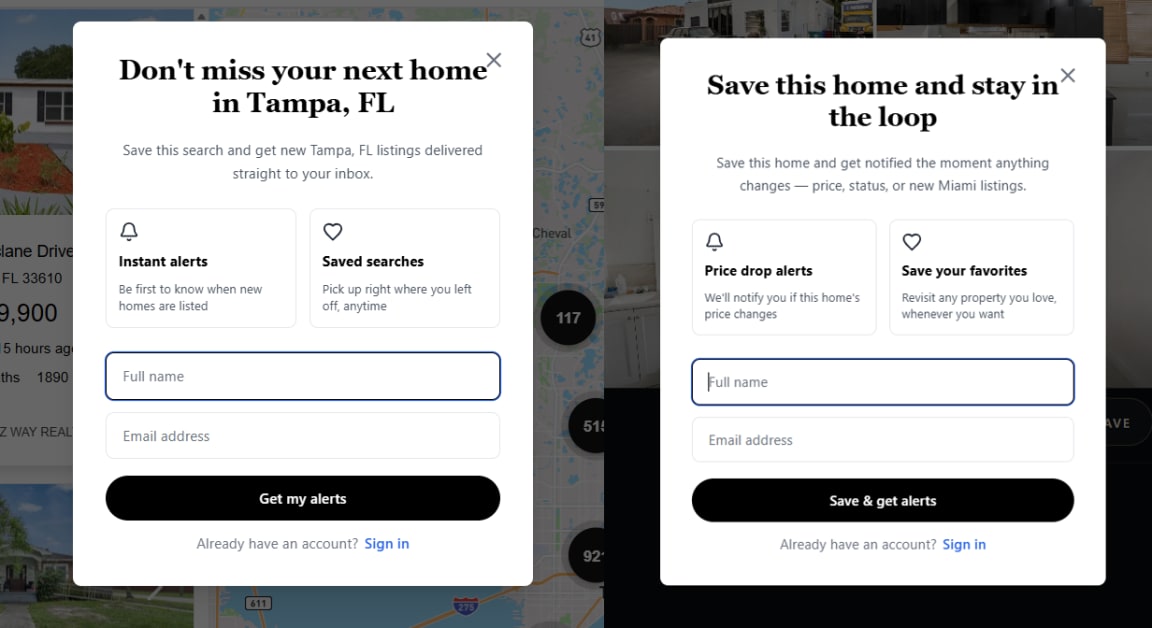
Personalized Sign-Ups for Saved Searches & Homes

When a logged-out visitor saves a search or favorites a home, they now get a sign-up tailored to that action and location.

  • Logged-out visitors who save a search or home get a personalized sign-up, not a generic login
  • Just name and email, and the save completes automatically right after
Two AeroIDX personalized sign-up modals side by side. One is for saving a search, with copy tailored to the city; the other is for saving a home, with price and status alerts. Each has a short name and email form
feature

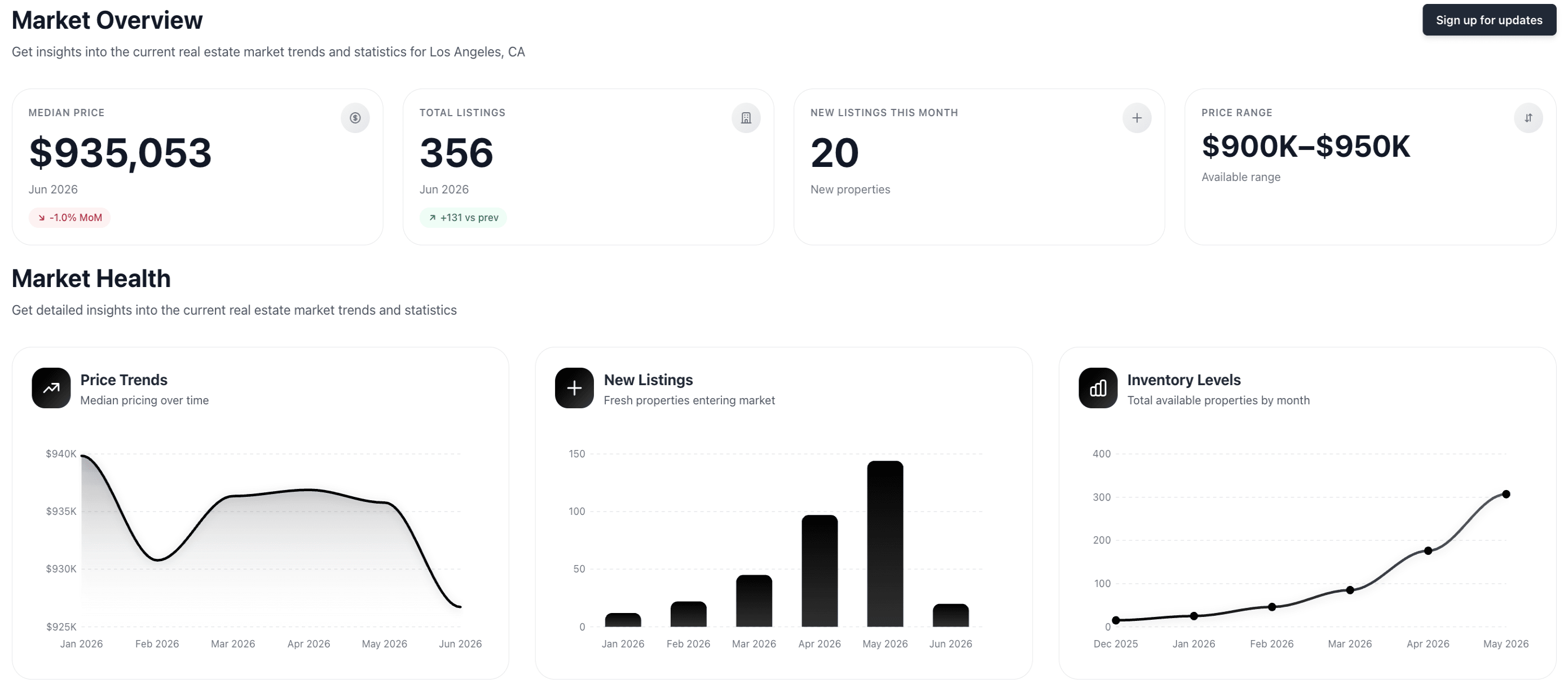
Custom CSS for the Market Graphs

Load your own CSS into the Markets page to fully personalize how the market graphs render across your office. Keep as many themes as you want side by side and switch the active one whenever you need a different look.

  • Upload your own CSS stylesheets for the Markets page
  • Restyle the Price Trends, New Listings, and Inventory Levels graphs to match your brand
  • Save multiple themes and switch the active one with a single click
  • The active theme renders instantly
  • Upload a .css file or paste and edit directly in the browser
  • Download a starter template to skip the boilerplate
AeroIDX Appearance settings showing the Custom CSS tab with the Markets section selected and a CSS editor for the market graphs
improvement

Find Your Facebook Ads Feeds Faster

The Facebook Ads Feed Generator now lets you search, filter, and page through your markets so the right feed is always a few keystrokes away.

  • Search any market feed by name and jump straight to it instead of scrolling the whole list
  • Filter and sort your feeds to surface exactly what you need
  • Pagination keeps long market lists fast and easy to navigate
Facebook Ads Feed Generator page showing a search bar, sort dropdown, and a paginated list of market feeds with their property types, max listings, and feed status
feature

Build Widgets & Markets through the MCP

The AeroIDX MCP gains new tools so your assistant can create widgets and markets for you without clicking through the dashboard.

  • Spin up a brand-new widget straight from your assistant, and browse the available widget types before you build
  • Create a new market on the fly without leaving the conversation
  • Pull up every market you've defined at a glance
feature

Add Videos to Supplemental Listings

Supplemental listings now support video.

  • Add a video to any supplemental listing by pasting a URL, either YouTube or a direct video file
  • See a live preview of the video before you save
  • The video appears inside the listing's gallery alongside the photos
Add Video by URL panel in the supplemental listing editor, with a YouTube link pasted in the input and a live preview of the video showing a Southern California luxury home below
improvement

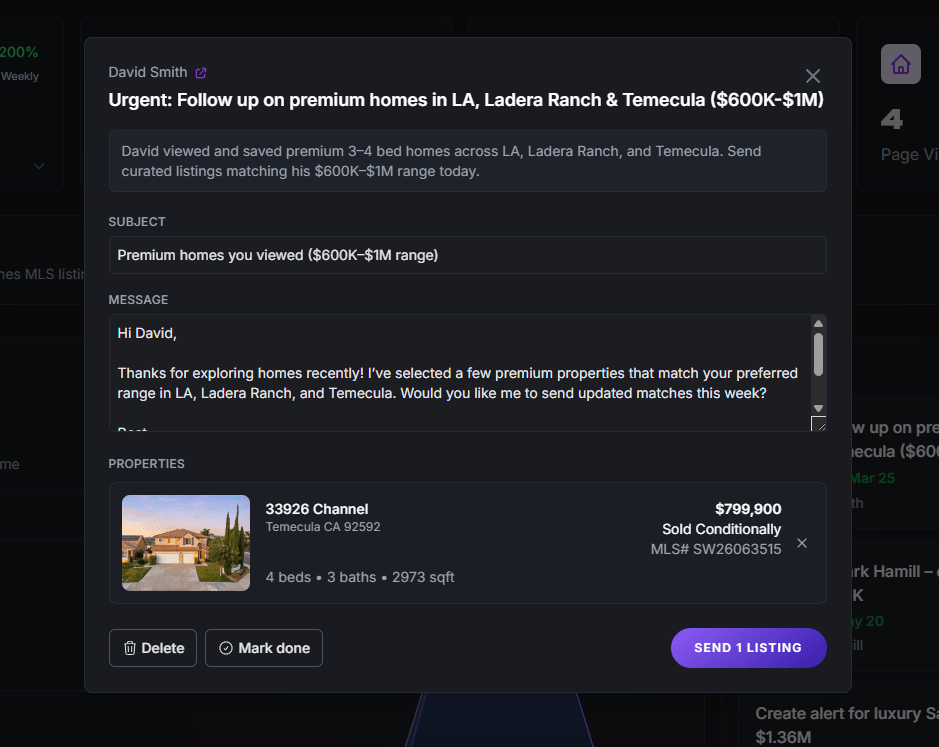
Next Steps Tasks Now Open with Every Detail

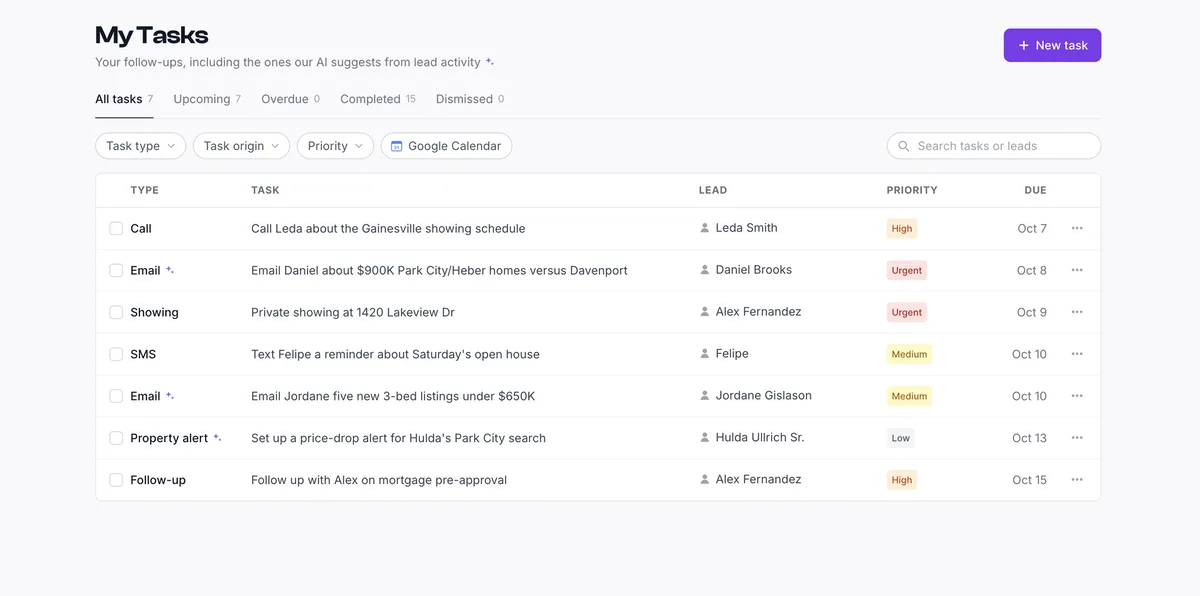
The AI-generated tasks in Next Steps are now easier to act on. Email follow-up tasks open with every detail and action button right in front of you. Property alert tasks take you straight to the saved search builder with the filters already filled in.

  • Email follow-up tasks now show the subject, message, properties, and action buttons all at once
  • Property alert tasks jump straight into the saved search builder for you
Next Steps task modal for an email follow-up, showing the subject, message, selected property, and Delete, Mark done, and Send Listing action buttons all visible at once
improvement

Widget Previews, Descriptions & a Categorized Picker

Widgets are easier to recognize at a glance. Every widget now shows a skeleton preview of its layout and a short description of what it does, and the New Widget picker groups everything by category.

  • Every widget card now shows a skeleton preview plus a short description
  • The New Widget picker is now organized by category
  • Browse the picker with the same previews and descriptions while you choose
AeroIDX Widgets page showing widget cards, each with a skeleton preview of its layout, a name, and a short description
feature

Polygon Search for Carousel & Gallery Widgets

Power your Carousel and Gallery widgets with polygon search to show listings from a specific area.

  • Use polygon search to pull listings for an exact area on Carousel and Gallery widgets
  • Draw the boundary you want instead of relying on a broad location search
  • Toggle between Search by Location and Search by Polygon right in the widget's Filters panel
Gallery widget settings panel open to the Filters tab, with the Location section set to Search by Polygon and a map of Los Angeles showing clustered listing counts
feature

Default Property Types

Choose which property types are pre-selected on your site's search page.

  • Mark any enabled property type as a default for the search page
  • Visitors land on search with your preferred property types already selected
  • Mix and match defaults across types like Condo, Single Family Home, and Townhouse
Property Types settings panel with toggles for each type and a star button to mark defaults. Condo, Single Family Home, and Townhouse are flagged as defaults for the search page
feature

Market Areas Staggered Style

A new Staggered theme for the Market Areas widget. It shows your areas in an alternating, magazine-style layout.

  • Pick the new Staggered theme from the Style tab on any Market Areas widget
  • Area cards alternate up and down for a magazine-style rhythm
  • Each card shows a full-bleed photo with the area name and a More Details CTA
Market Areas widget editor with the Style tab open and the new Staggered theme selected, showing a preview of Premier Areas with cards (Oakland, Los Angeles Golf, Palo Alto, Cupertino, San Jose) arranged in an alternating up-and-down layout with full-bleed photos
feature

Listing Page Layout

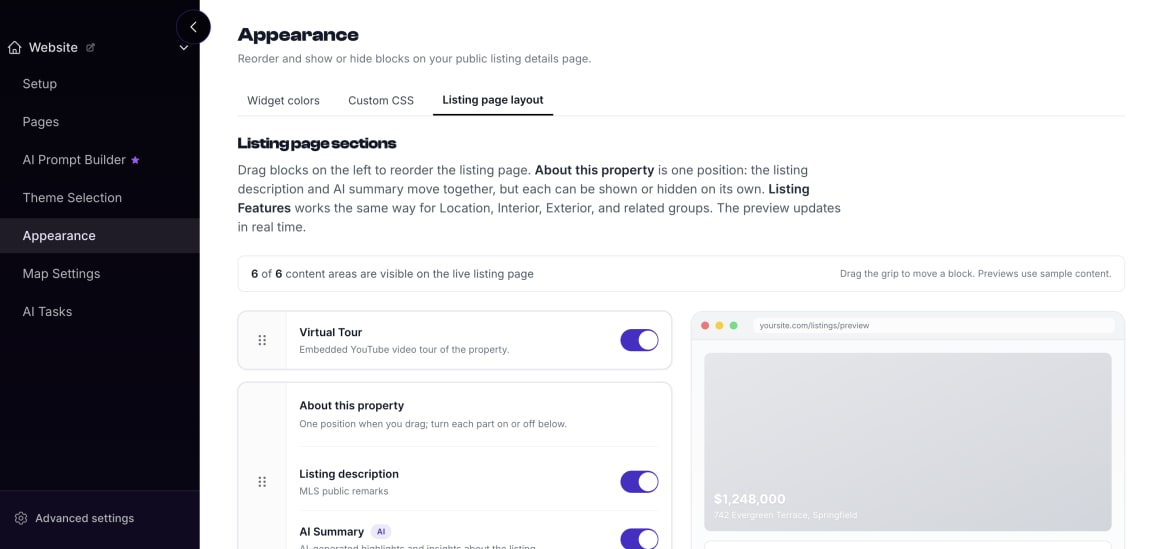
Decide the order of the blocks on your Listing Details page, and which ones show at all. The new Listing page layout tab lives inside Appearance.

  • Drag and drop blocks to reorder the Listing Details page
  • Show or hide each section with a single toggle
  • Live preview updates in real time as you reorder or toggle
Appearance settings on the Listing page layout tab showing draggable blocks (Virtual Tour, About this property with Listing description and AI Summary) and a live preview of the public listing details page
feature

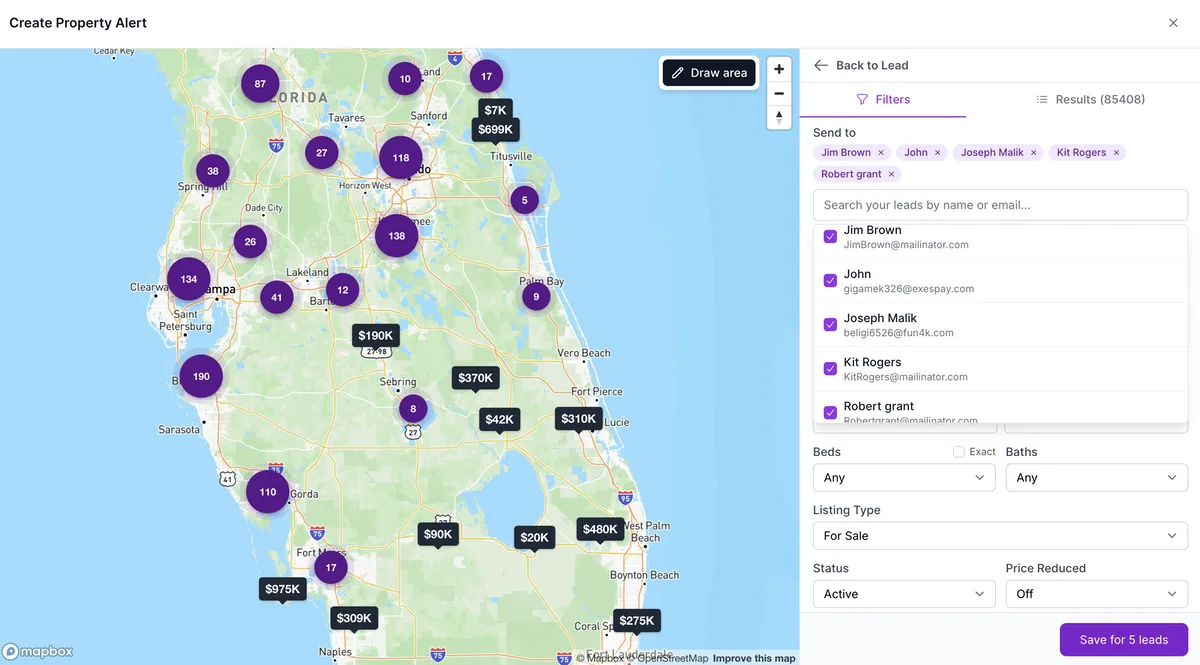
Smart Search

Open any lead, and AeroIDX now proposes a tailored Property Alert based on what they've actually been browsing. The new Smart Search section inside the Lead Details reads the lead's activity and turns it into the criteria most likely to match what they're looking for, so you do not build the alert from scratch.

  • New Smart Search section inside the Lead Details modal
  • AI-generated Property Alert suggestion based on the lead's real activity
  • Infers intent from past searches, viewed listings, and engagement signals
  • Save the suggested alert with a single click
Smart Search section inside the Lead Details modal with an AI-generated Property Alert suggestion based on the lead's browsing activity
feature

Custom CSS for the Listing Details Page

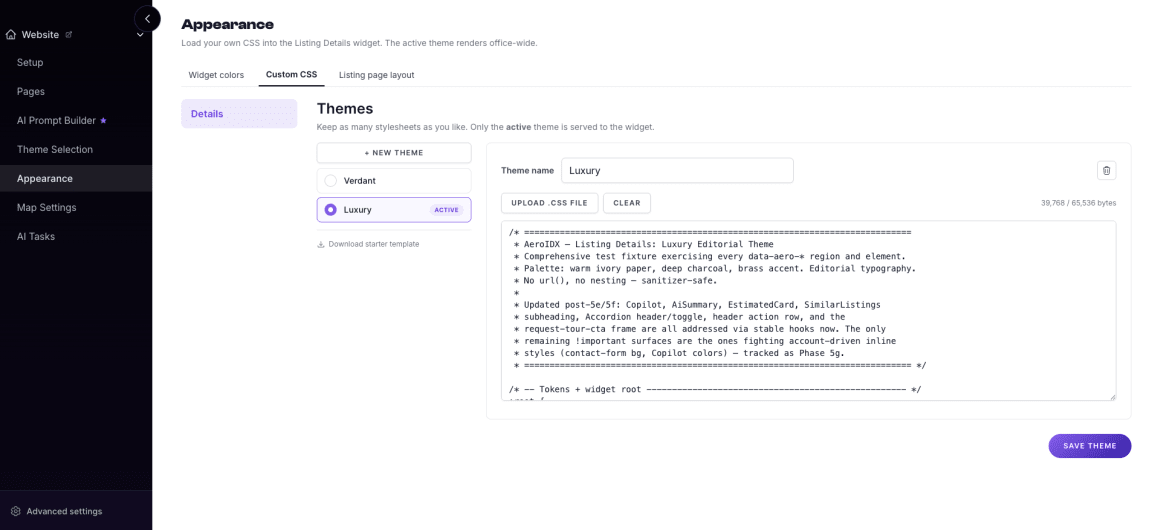
Load your own CSS into the Listing Details to fully personalize how listings render across your office. Keep as many themes as you want side by side and switch the active one whenever you need a different look.

  • Upload your own CSS stylesheets for the Listing Details
  • Save multiple themes and switch the active one with a single click
  • The active theme renders instantly
  • Upload a .css file or paste and edit directly in the browser
  • Download a starter template to skip the boilerplate
AeroIDX Appearance settings showing the Custom CSS tab with multiple saved themes (Verdant, Luxury active) and a CSS editor for the Listing Details
feature

AI Search Widgets

We rebuilt the AI Search Bar and the AI Search Drawer. They now understand plain-language queries and work across every MLS available in AeroIDX.

  • Rebuilt AI Search Bar and AI Search Drawer with full natural language understanding
  • Choose your provider: ChatGPT or Claude
  • Smarter filter matching, no matter how specific your query
AI Search Bar and Drawer translating a natural language query into property results, with a provider selector showing GPT and Claude options
feature

Draft Property Emails with AI

When you send properties to a lead, AeroIDX can now write the email for you. The new Draft with AI button generates a personalized subject line and message based on the lead and the listings you selected, replacing the generic placeholder that agents had to rewrite by hand.

  • New Draft with AI button inside the Send Properties to Lead modal
  • Generates a tailored subject line that references the selected listings
  • Writes a personalized message using the lead's context and the properties you picked
  • Replaces the old generic placeholder, so you start from a real draft instead of a blank slate
  • Fully editable, so you can tweak the subject and message before hitting Send Properties
Send Properties to Lead modal showing the Draft with AI button and a generated subject line and message tailored to the selected listings
feature

Introducing the Prestige Package

Prestige is a new add-on that unlocks AeroIDX's AI suite in a single upgrade. It bundles Facebook Ads automation, Home Valuation AI, the MCP Server, and the AI Prompt Builder into one subscription.

  • Facebook Ads: turn your markets into automatic feeds that keep your Facebook ads updated with fresh property listings
  • Home Valuation AI: add an AI-powered home valuation experience to your website
  • MCP Server: give your AI tools real-time access to your leads, CRM, and property data through the Model Context Protocol
  • AI Prompt Builder: build custom AI prompts tailored to your website and brand
  • Available as a $100/mo add-on on top of your existing AeroIDX subscription
feature

Send Updates to Lead, Agent, or Both

Saved searches now let you decide who gets notified when a new listing matches the filters. Pick Lead (the default) to keep things as they were, Agent to keep your team in the loop without alerting the client, or Both when everyone needs to see the match in real time.

  • New Notify control inside the Saved Search builder
  • Send matching listings to the Lead, the Agent, or both
  • Lead remains the default to preserve existing behavior
  • Choose Agent-only to monitor activity without notifying the client
  • Choose Both to keep agent and lead aligned on every new match
Saved Search builder showing the Notify control with Lead, Agent, and Both options
feature

Advanced Filters for Map Search

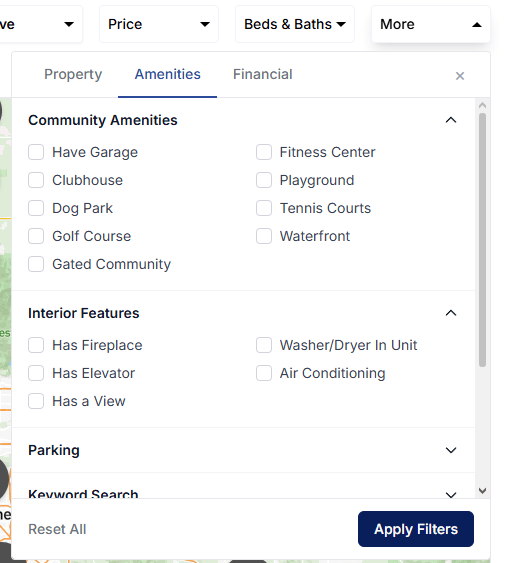
We've expanded the map search with a set of advanced filters. You can now narrow down listings by amenities, community interior, parking, HOA costs, taxes, year built, size, lot, home features, and more. They all live under the new More dropdown.

  • Filter by amenities and community interior features
  • Keyword search for parking type and availability
  • Set a maximum HOA fee and maximum annual taxes
  • Filter by year built, square footage, and lot size
  • Narrow results by specific home features
  • Filter by time on market to find fresh or long-standing listings
  • All advanced filters accessible under the More dropdown
Advanced filters panel in map search showing options for amenities, community interior, parking, max HOA, max annual taxes, year built, square footage, lot size, home features, and time on market
feature

Infinite Scrolling on Map Search

Map search now uses infinite scrolling instead of page numbers. Listings load continuously as you scroll, so you never wait for the next page to load.

  • Listings load automatically as you scroll down
  • No more page numbers breaking your search flow
  • Faster, smoother browsing through large listing sets
  • Stay on the map while new results load below the ones you have already seen
feature

Follow Up Boss CRM Integration

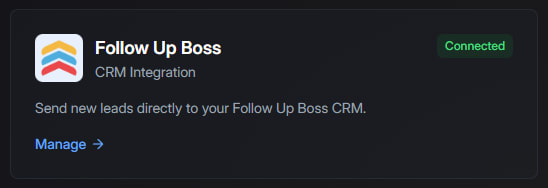
AeroIDX now connects with Follow Up Boss. Leads and client activity events captured on your IDX site flow directly into Follow Up Boss, so your team can follow up faster without switching between platforms.

  • New leads are automatically pushed to Follow Up Boss
  • Client activity events sync in real time
  • Easy setup with your Follow Up Boss API key
  • Test contact tool to confirm the connection before going live
  • Supported for individual agents and agency-managed clients
Follow Up Boss integration settings page in AeroIDX showing API key configuration and connection status
feature

SureSend CRM Integration

AeroIDX now integrates with SureSend. All your leads and client activity events are automatically sent to your SureSend account, keeping your pipeline in sync without any manual work.

  • Leads captured on your IDX site are instantly sent to SureSend
  • Client activity events are forwarded in real time
  • Simple setup using your SureSend API key
  • Test connection tool to verify everything is working before going live
  • Available for individual agents and agency-managed accounts
SureSend integration settings page in AeroIDX showing API key configuration and connection status
feature

Show Only Rentals Filter

We added a dedicated toggle to the Gallery settings. Enable Show only rentals in the Filters tab to display only for-lease properties, which hides every for-sale listing from view.

  • Simple toggle in Gallery settings for rental-only views
  • Instantly hides all sales listings
  • Makes it easier to focus on lease opportunities
Gallery settings showing the 'Show only rentals' filter toggle in the Filters tab
feature

AI-Powered Next Steps

The Next Steps section now reads your leads' behavior and creates prioritized follow-up tasks from real client activity.

  • Automatically generates tasks when clients save properties or show high intent
  • AI-powered smart suggestions highlighted with the ✨ icon
  • Tasks are tagged (Urgent, High) to help you focus on the right leads first
  • Instant reminders when clients interact with high-value listings, including luxury homes and condos
AI-Powered Next Steps interface showing prioritized follow-up tasks with smart suggestions, urgency tags, and automated task generation based on client activity
feature

New Agents Setup & Roster Integration

A new Agents section loads your team from their Agent and Office IDs, holds their photos and bios, and puts them on your Roster page.

  • Enter Agent ID and Office ID to automatically load agents
  • Add agent photos, bios, and social media links
  • Agents appear on the Roster page with active listings
  • Connect agents to their HighLevel users for automatic assignments
Agents setup and roster integration interface
feature

New Leads Tab Now Available

The new Leads Tab puts every registered lead in one place, so you can find and open any of them without digging through the dashboard.

  • View all registered leads in one place
  • Search and open individual lead profiles
  • Create alerts directly from a lead profile
  • Filter leads by registration date
  • See saved searches and saved properties
  • Add new contacts directly from the Leads tab
  • Create leads instantly in GHL with a single action
New Leads tab interface
feature

Search by Keyword Now Available

You can now search for properties by keyword to quickly find results that match specific criteria, such as listings with pools or ocean views.

Search by keyword feature showing property search interface
performance

Improved Page Load Speed

We've made several optimizations to speed up your browsing experience. Properties and images now load faster, and images only load when you're about to see them.

Improved page load speed showing faster property gallery loading
improvement

AI Copilot Now Works with Supplemental Properties

The Copilot assistant can now look up information on supplemental properties, so you get accurate data on those too.

AI Copilot interface for supplemental properties